Email Management
Under Administration > Email (/v2/admin/email), the email system of calServer v2 is configured. Mail management is fully ported from v1: actions (scheduled bulk mails to recipient groups) with templates that generate reports from the report management as attachments, plus queue and send log.
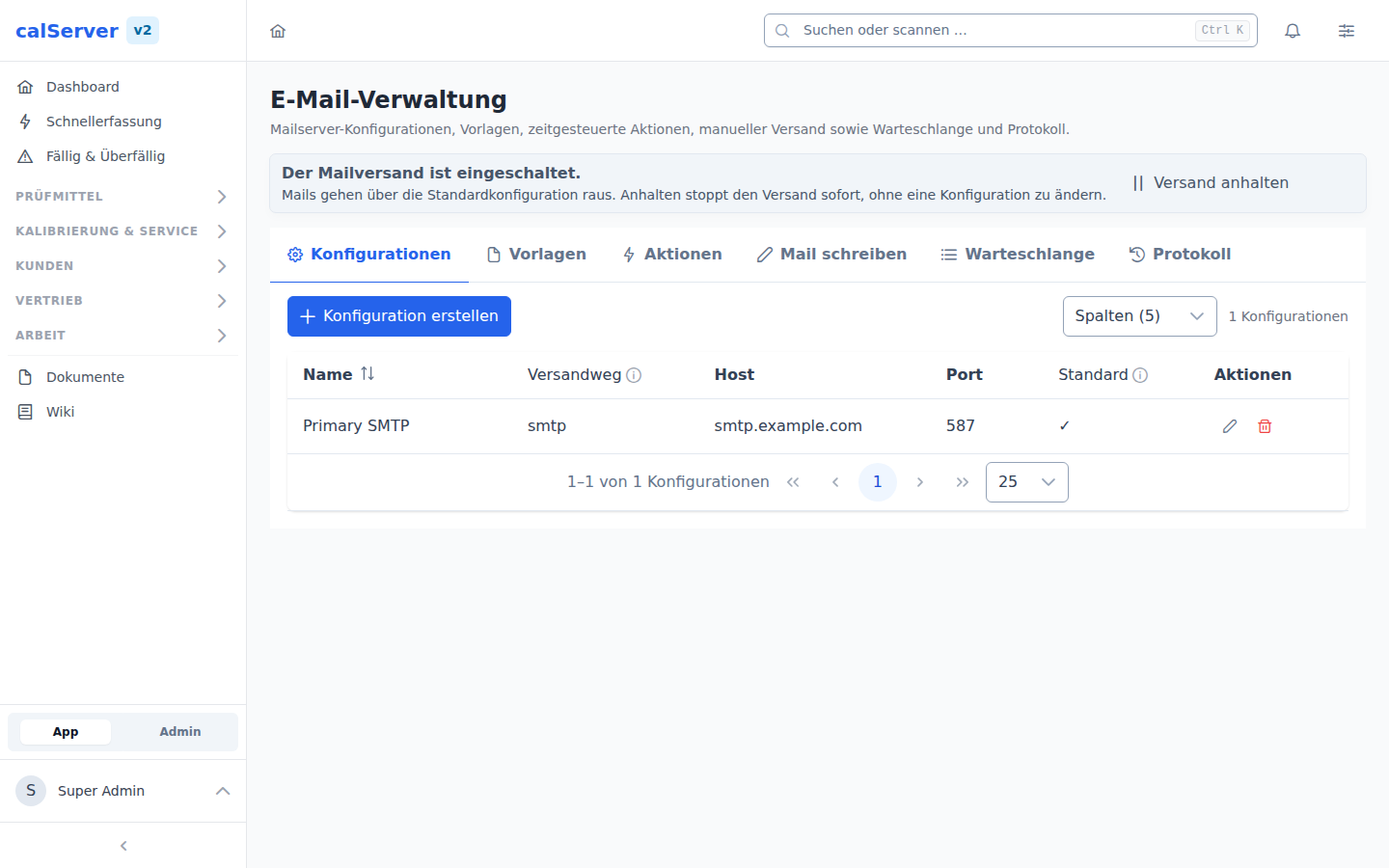
Master switch: pausing outbound mail
The top of the page states whether mail is going out at all — with the button that changes it. Pause sending stops every send immediately, without touching a configuration or disabling an action.
This is the emergency stop for when something goes wrong: an action addressed to the wrong distribution list, a mail server producing bounces, an import that triggered a thousand reminders. Until now that would have meant touching the container or breaking each configuration by hand — neither of which an operator has without a service agreement.
What a paused send does:
- New mails are not sent. They land in the log with status "not sent" and the reason "sending is switched off in administration". No entry claims a send that never happened.
- Nothing is caught up. Switching back on does not redeliver the mails suppressed in the meantime; they sit in the log and have to be resent manually if needed.
- Entries already in the queue stay there and are processed normally once sending is on again.
The state lives in the database and survives restarts and cache:clear. The default is
on — an update never switches anyone's mail off.
Changing it requires email_management_edit, seeing it email_management_view.
Sections
Configurations
SMTP configurations (multiple possible, exactly one default):
| Setting | Description |
|---|---|
| Transport | SMTP, PHP mail() or sendmail |
| SMTP host / port | Mail server (25, 465, 587) |
| Encryption | TLS / STARTTLS / SSL / none |
| Username / password | SMTP authentication |
| Default | Use as default configuration |
| Sendmail path | Path to the sendmail binary (transport sendmail only) |
If no configuration is flagged as default, sending uses the oldest configuration (lowest ID, as in V1) — not the alphabetically first one in the list.
Transport inside the container
Sending runs through exactly this configuration — no MAIL_* environment
variables required. Two transports need something the API container does
not ship, though: sendmail expects the sendmail binary inside the
container, and PHP mail() hands over to the deployment's platform
transport (MAIL_MAILER; if that is log, nothing is delivered).
SMTP is the recommended transport — it works without further
prerequisites. Failed attempts appear with the real error message in the
log.
Unlike V1, V2 verifies the mail server's TLS certificate. An internal
relay with a self-signed certificate that worked under V1 will then fail
with a certificate error in the log — MAILER_VERIFY_PEER=false in the
server environment restores the old behaviour (applies to the whole
installation).
Templates
Templates define sender, subject and HTML body — with placeholders ([FULLNAME], [FIRSTNAME], [LASTNAME], [EMAIL], [FIRM], [DOMAIN], also lowercase) resolved per recipient.
Report attachment (report management): a template can configure a master report as attachment. On send, the report is generated per recipient through the report engine (incl. letterhead overlay) and attached as PDF. The due-date filter (due, overdue, critical 1–3) parameterises the report with the periods from the rules (due_date_period, critical_date_period_1..3).
System templates and action templates
There are two kinds of template, and the difference is not cosmetic:
System templates carry a fixed key (hide_name) and are looked up by the program when a specific event occurs. Their placeholders come from that trigger — a task template gets [TASK_URL], a ticket template [TICKET_ID] — so they are not usable in a mailer action.
| Key | Trigger | Placeholders |
|---|---|---|
task_create |
Task created | [TITLE] [DESCRIPTION] [SUBJECT] [INFO] [CREATOR] [TASK_URL] |
task_update |
Task changed | [TITLE] [DESCRIPTION] [SUBJECT] [CHANGES] [UPDATER] [TASK_URL] |
reminder_repair |
Maintenance date passed | [TITLE] [SUBJECT] [DESCRIPTION] [CREATOR] [TASK_URL] |
location_create |
Loan entry created (loan receipt) | [TITLE] [DESCRIPTION] [SUBJECT] [INFO] [CREATOR] [LOCATION_URL] |
location_update |
Loan entry changed | [TITLE] [DESCRIPTION] [SUBJECT] [CHANGES] [UPDATER] [LOCATION_URL] |
support_create_ticket |
Ticket created | [TICKET_ID] [TITLE] [DESCRIPTION] [CREATOR] [ASSIGNEE] [PRIORITY] |
support_update_ticket |
Ticket changed | [TICKET_ID] [TITLE] [DESCRIPTION] [UPDATER] [ASSIGNEE] [PRIORITY] |
support_comment_ticket |
Ticket commented on | [TICKET_ID] [TITLE] [COMMENT] [UPDATER] |
password_reset |
Password reset requested | [FULLNAME] [FIRSTNAME] [LASTNAME] [EMAIL] [RESET_URL] [VALID_HOURS] [DOMAIN] |
When a system template is missing, the corresponding mail is silently skipped — the notification then looks switched off. php artisan mailer:seed-templates adds the missing ones (see below).
Action templates have no key and are freely selectable in an action or under "Compose mail". Their placeholders come from the recipient expansion: [FULLNAME], [FIRSTNAME], [LASTNAME], [EMAIL], [FIRM], [DOMAIN] — each also lowercase. Shipped are "Kalibrierung fällig", "Kalibrierung überfällig" and "Geräteübersicht"; a report attachment still has to be assigned.
Language variants
System templates ship in two versions: the base row is German, the English one lives under the key {hide_name}.en (name with an "(EN)" suffix). Which one is used is decided by the default language in the general settings — without a variant the base row applies.
Both versions are editable in the template list like any other. The key itself is not: it is the contract with the calling part of the program, and a typo in it would silently switch the notification off. A third language therefore currently needs an entry in the catalogue (MailerTemplateCatalog), not just a click in the UI.
This does not apply to action templates: they have no key and therefore no variant. There you pick the language by picking that language's template in the action. The language field on the action is a label, not a switch.
Actions
Scheduled bulk mails (v1 mailer actions):
| Field | Meaning |
|---|---|
| Template / configuration | Which template over which SMTP transport |
| Recipient group | The group's users (with per-user opt-out) and the group's customers via the configured customer e-mail field |
| Start / end | Window in which the action is active |
| Weekdays / months / days of month | Crontab-style fine control (comma lists, empty = all) |
| Send without attachment | Send even when no report was generated |
| Archive attachments | Keep generated reports permanently |
Row actions: test send to the system address (shield icon) and send to the recipient group now. A duplicate guard prevents more than one successful send per action, recipient and day on automatic runs.
Queue
The queue shows every generated e-mail with its status:
| Status | Description |
|---|---|
| Pending | Waiting for the next processing run |
| Sending | Currently being sent |
| Sent | Delivered successfully |
| Failed | Delivery failed (with error message) |
| Not_Send | No attachment generated and "send without attachment" disabled |
Log
Every send (success and failure) is recorded in the send log (mailer_message) with recipient, subject, error message and record link.
The sign-in mails are in here too — password reset, registration confirmation, welcome mail, each with link_table = user. This is where the most common question gets answered ("I never got a password link").
Processing
The run php artisan mailer:process (scheduler: every 5 minutes) executes due actions and processes the queue in batches — the v2 counterpart of the four v1 crons (Mailer, ExportReport, SendEmailQueue, DeleteReport). Temporary report attachments are deleted after the send; archived ones remain under storage/app/mailer/archive/.
Adding missing templates
As of 5.65 the container start creates whatever is missing. An update therefore brings the factory defaults along by itself, on an existing installation too — and even when the migration run of that same start fails.
Up to 5.64: existing installations got no templates
Before that, the factory defaults were written only by php artisan db:install — the setup run of a fresh installation. Anyone updating via migrate saw a permanent "0 templates" in the template list, and every feature looking up a system template fell back to its hard-coded text.
If the list is still empty after updating to 5.65, the reason is in the startup log (docker logs calserver-api-v2, line Ensuring factory mail templates). If the table itself is missing there, the schema is incomplete — see Operations → Database schema state.
Adding them by hand still works:
The command only creates what is missing — existing templates stay untouched, including the ones carried over from v1 and the ones edited on site. System templates are matched by their key, action templates by their name.
--update-existing additionally resets subject, body and description of existing templates to the factory default, discarding edited texts — hence the confirmation prompt. Name, sender, Cc/Bcc and the attachment configuration are kept even then; those are site setup, not factory defaults.
Permissions
Reading requires email_management_view; changing and manual runs require email_management_edit.