Architecture — Containers & URL Routing
Container Architecture
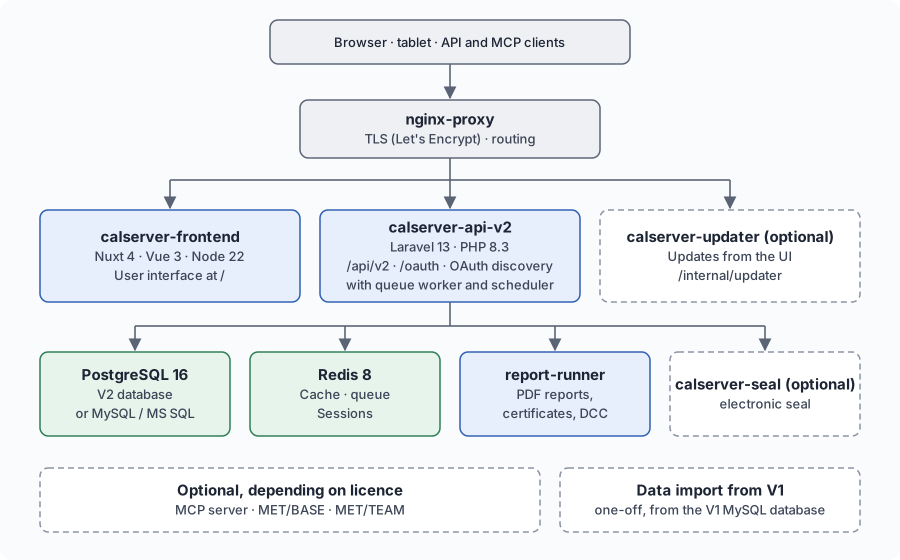
calServer v2 stands on its own: frontend, API and their services form the complete stack, no V1 installation is needed. Solid boxes always run, dashed ones only when they are set up or licensed.
| Container | Role |
|---|---|
nginx-proxy |
TLS termination (Let's Encrypt) and path routing |
calserver-frontend |
Nuxt 4 user interface |
calserver-api-v2 |
Laravel API with queue worker and scheduler, OAuth and MCP endpoint |
calserver-postgres |
V2 database (PostgreSQL 16); or an existing MySQL or SQL Server instance, see Database Configuration |
redis |
Cache, queue and sessions |
report-runner |
Renders PDF reports, calibration certificates and DCC |
calserver-seal |
Electronic seal for certificates (optional) |
calserver-updater |
Updates from the user interface (optional) |
calserver-mcp, calserver-metbase, calserver-metteam |
Extensions depending on licence (optional) |
V2 imports the data of an existing V1 installation once, when switching over, see Installation. After that V2 no longer touches the V1 database.
URL Routing
| Path | Service | Description |
|---|---|---|
/ |
calserver-frontend | User interface |
/api/v2/* |
calserver-api-v2 | REST API v2 (incl. MCP endpoint /api/v2/mcp) |
/oauth/* |
calserver-api-v2 | OAuth 2.1: authorize, token, register (DCR), login bridge |
/.well-known/oauth-* |
calserver-api-v2 | OAuth discovery (RFC 8414 / RFC 9728) |
/mcp, /mcp-server |
— | 308 redirect to /api/v2/mcp |
/internal/updater/* |
calserver-updater | Update service (only when set up) |
Existing installations with V1 alongside
Where V1 still runs on the same host, the V2 interface lives under /v2/
and V1 at /. docker/nginx/v2-primary.sh on moves V2 to the root there
as well. New installations never see this case.
The routing rules live in docker/nginx/vhost.d/default_location and are
included by nginx-proxy into the server block of every VIRTUAL_HOST.
This file is not part of any image
nginx-proxy runs from the upstream nginxproxy/nginx-proxy image; this
repo does not build it. The routing file is bind-mounted from the host
(./nginx/vhost.d), so an image update does not carry it along. The deploy
syncs it via docker/sync-nginx-vhost.sh — including nginx -t and a
rollback on syntax errors. The V2-primary switch in the same file is
host-managed and survives the sync. Manually on the server: replace the
file, then
docker exec nginx-proxy nginx -t && docker exec nginx-proxy nginx -s reload.
MCP endpoint and OAuth
The MCP (Model Context Protocol) server is served at
https://<domain>/api/v2/mcp — that is the URL to enter in the claude.ai
connector. /mcp and /mcp-server redirect there with 308 (method and body
of the JSON-RPC POST are preserved).
The endpoint alone is not enough: an MCP client starts with a discovery
request against the origin root, not the endpoint path. Those paths must
reach the Laravel container as well, otherwise the handshake dies even though
/api/v2/mcp answers correctly:
| Path | Purpose |
|---|---|
GET /.well-known/oauth-protected-resource/api/v2/mcp |
Resource metadata (RFC 9728) |
GET /.well-known/oauth-authorization-server |
Authorization server metadata (RFC 8414) |
POST /oauth/register |
Dynamic Client Registration (RFC 7591) |
GET /oauth/authorize, POST /oauth/token |
Passport |
GET/POST /oauth/login |
Session bridge for the consent screen |
/.well-known/acme-challenge/ is deliberately excluded (the prefix is
/.well-known/oauth-) so Let's Encrypt renewals keep working.
Since TLS terminates at the proxy, Laravel must trust it (trustProxies in
bootstrap/app.php) — otherwise discovery advertises http:// URLs and the
client refuses to connect. If the public origin differs from what Laravel
derives, set MCP_AUTHORIZATION_SERVER explicitly.
The alternative to the in-app endpoint is the standalone calserver-mcp
container on its own subdomain (MCP_HOST, connector URL
https://<MCP_HOST>/mcp) — see
mcp-server/README.md.
Running both at once is not intended: set MCP_ENABLED=false so only the
container acts as the MCP server.
Startup
The easiest way is the one-click installer, see
One-command trial. By hand, in docker/:
docker compose -f docker-compose.v2.yml -f docker-compose.v2-standalone.yml up -d
# with Let's Encrypt
docker compose -f docker-compose.v2.yml -f docker-compose.v2-standalone.yml \
               -f docker-compose.https.yml up -d
With V2_STANDALONE=true in .env, deploy.sh picks these files itself.
Services
calserver-api-v2 (Laravel)
- Image:
calhelp/calserver-api-v2 - Base: PHP 8.3 FPM (Debian bookworm)
- Includes: Nginx, PHP-FPM, Queue Worker (Supervisor)
- Health:
GET /health→{"status":"ok"} - Volumes: filemanager (read-only)
- Env: DB credentials, Pusher keys, Redis connection
calserver-frontend (Nuxt)
- Image:
calhelp/calserver-frontend - Base: Node 22 Alpine
- Includes: Nitro Server (Nuxt SSR runtime, SPA mode)
- Health:
GET /→ 200 - Env: API base URL, Pusher keys
redis
- Image: Redis 8 Alpine
- Purpose: Cache, Queue, Session Store for Laravel
- Persistent: Volume
redis_data