SSO and LDAP
Under Administration > SSO (/v2/admin/sso), single sign-on and LDAP login are configured. Both methods are fully implemented in v2 as login methods — including just-in-time provisioning (JIT) and role/group mapping.
Supported methods
| Method | Description |
|---|---|
| SAML 2.0 | Single sign-on via any identity provider that speaks SAML 2.0 (Microsoft Entra ID, ADFS, Keycloak and others); sign-in button on the login page |
| LDAP bind | Login against OpenLDAP or Active Directory; "Sign in via LDAP" checkbox on the login page |
Configuration is V1-compatible: all settings live under the same property keys (settings/EntraID, settings/LDAP, settings/LDAP_UserProperty, settings/LDAP_RoleMapping) — configuration taken over by the V1→V2 migration works unchanged. For V1 reasons the key is still called EntraID, but it applies to every SAML provider.
SAML 2.0
Choosing the identity provider
At the top of the SAML tab, Identity provider offers Microsoft Entra ID, Microsoft ADFS, Keycloak or "Other identity provider". The choice only changes hints, example values and the sign-in button; the SAML connection is the same for all (onelogin/php-saml library).
| Choice | Sign-in button | Admin hint |
|---|---|---|
| Microsoft Entra ID | "Sign in with Microsoft" (Microsoft icon) | Enterprise application, group claim carries object IDs |
| Microsoft ADFS | "Sign in with single sign-on" | Relying party trust via metadata URL, groups via claim rule |
| Keycloak | "Sign in with single sign-on" | Import the client via metadata URL, "Group list" mapper |
| Other | "Sign in with single sign-on" | general hints |
Installations whose SAML connection was set up before this choice existed count as Entra ID while no choice is stored, and keep the Microsoft button. A new installation starts neutral.
Keycloak: sign the assertion
calServer only accepts signed assertions (protection against forged responses). By default Keycloak signs only the document. In the Keycloak client, switch on Sign assertions under Keys, otherwise every sign-in is rejected. Entra ID and ADFS sign the assertion out of the box.
Attribute mapping
Which SAML attributes count as email, first and last name is set in Attribute mapping (SAML → user field); the group attribute under Provisioning (default groups). Empty fields use the standard claims (…/claims/emailaddress, givenname, surname) that Entra ID and ADFS send; without any email the NameID is used. The fields share their values with the LDAP attribute mapping.
Login flow
- With SAML enabled, the login page shows the sign-in button (see the table above).
GET /api/v2/auth/saml/loginredirects to the identity provider (AuthnRequest).- The IdP posts the assertion to
POST /api/v2/auth/saml/acs; after validation and JIT provisioning the user is redirected to the frontend with a one-time code (valid 60 s, single use). - The SPA exchanges the code for an API token via
POST /api/v2/auth/sso/exchange— the token never appears in a URL.
Endpoints for IdP registration
| Endpoint | Purpose |
|---|---|
GET /api/v2/auth/saml/metadata |
SP metadata (for registration at the identity provider) |
POST /api/v2/auth/saml/acs |
Assertion consumer service |
GET/POST /api/v2/auth/saml/sls |
Single logout |
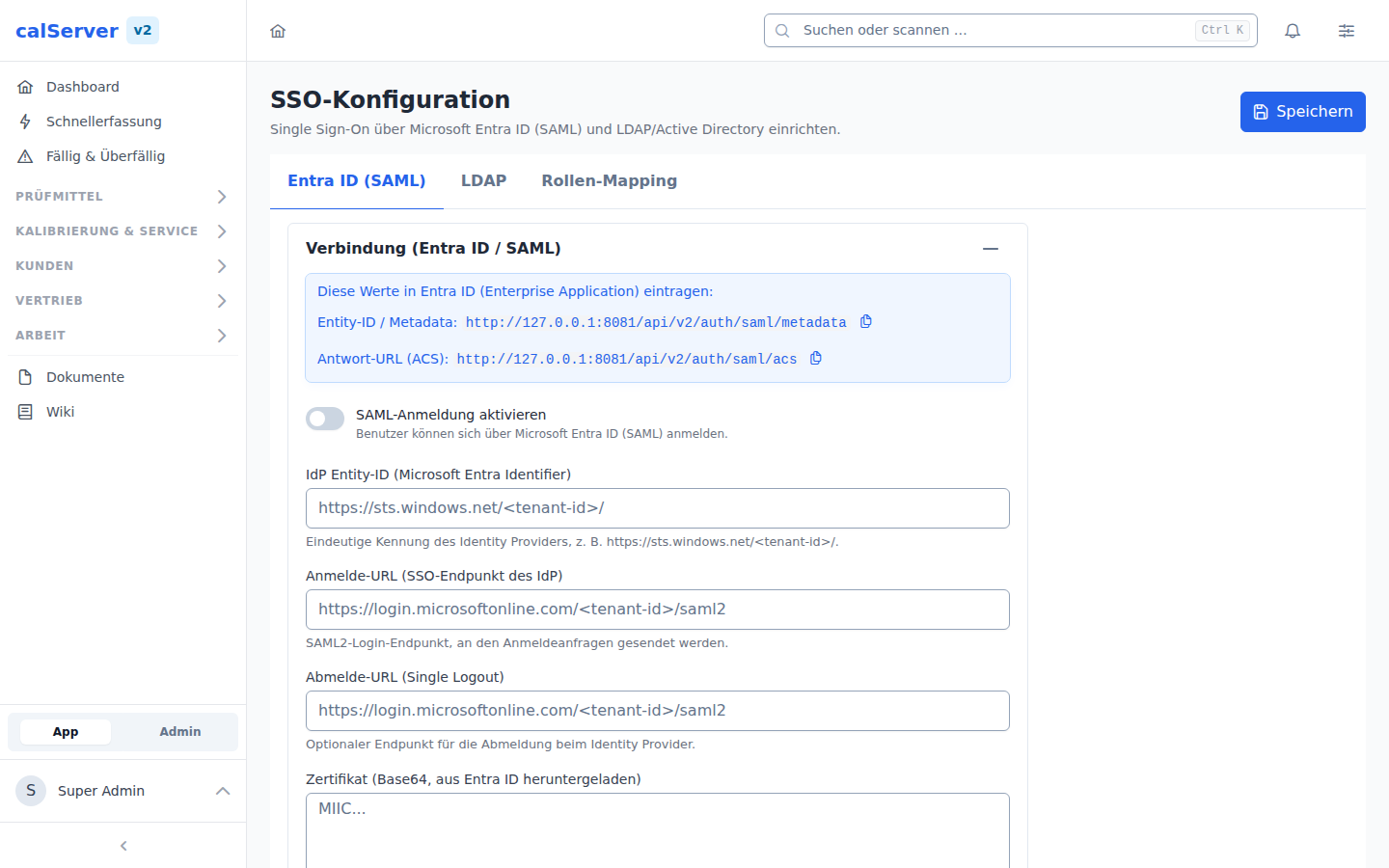
The SAML admin tab provides copy buttons for the metadata and ACS URLs plus the connection settings (entity ID, ACS URL, logout URL, the IdP's X.509 certificate, enable switch).
LDAP bind (OpenLDAP / Active Directory)
Login happens as an explicit login method (method: 'ldap'); the login field then also accepts plain usernames (e.g. sAMAccountName).
- Active Directory: service bind (bind DN + password) → user search under the base DN → bind with the found
distinguishedNameand the user's password. Groups frommemberOf. - OpenLDAP: user search → bind with a constructed DN (
user_id_key=login,base_dn). Group matching viagroupOfUniqueNames/uniqueMember. - Empty passwords are rejected before any bind — an anonymous bind can never pass as a login.
| Setting | Description |
|---|---|
| Server / domain controllers | LDAP server address(es) |
| Port | LDAP port (389/636), SSL/TLS switches |
| Base DN | base DN for the user search |
| Bind DN / admin password | service account for the search |
| User ID attribute | e.g. sAMAccountName or uid |
| Account suffix | optional UPN suffix |
| Attribute mapping | last name/e-mail/phone (defaults: sn, mail, telephoneNumber) |
The LDAP admin tab offers a "Test connection" button (POST /api/v2/admin/sso/ldap/test) that verifies the service bind with the current — even unsaved — form values.
Role and group mapping (JIT provisioning)
Via SSO Role Group Mapping, IdP/LDAP groups are automatically mapped to calServer roles and groups — identical semantics for SAML and LDAP:
- Specify the SSO group (Entra ID: group object ID, Keycloak/ADFS: group name, LDAP: group DN)
- Pick a calServer role and/or group from the dropdowns
- The mapping is applied on every login;
keep_existingswitches control merge vs. replace - If no mapping matches, the default role and default group are assigned
Role and group are selected from the existing roles (GET /api/v2/roles) and
groups (GET /api/v2/groups) instead of being typed freely. The API rejects
(422) a mapping that names an unknown role or group, or that sets neither —
such entries used to save fine but were silently ignored at login time.
A mapping carries exactly one role and one group. To grant members of one IdP group several roles, create several mappings for the same IdP group.
First login
On the first login via SSO/LDAP, a calServer user account is created automatically (JIT) and the configured roles/groups are assigned. Directly assigned operations of existing users remain untouched.