Navigation and Menu
The calServer v2 user interface is based on a modern Single Page Application (SPA) layout with a collapsible sidebar and a content area.
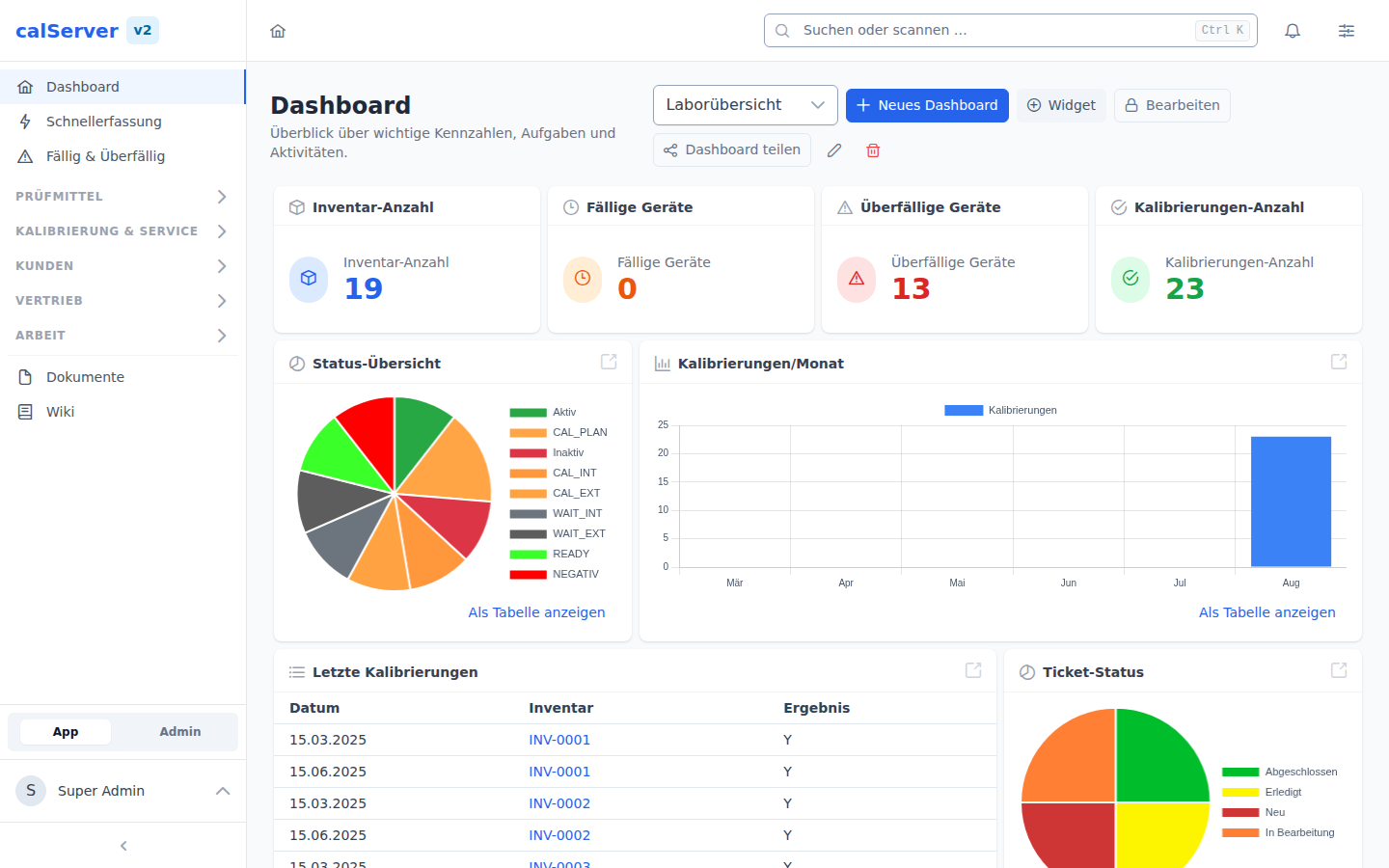
Sidebar
The sidebar is the central navigation element. It is organized into the following sections:
Main Navigation
Entries are arranged in groups. Only what your permissions allow is visible: an area you may not see is not in the menu at all.
| Group | Menu Item | Path | Description |
|---|---|---|---|
| — | Dashboard | /v2/ |
Start page with configurable widgets |
| — | Quick entry | /v2/inventory/quick-entry |
All four batch capture routes as tabs: quick entry, certificate import, serial creation, table import |
| — | Due & Overdue | /v2/inventory/due |
Work queue by due date |
| Test Equipment | Inventory | /v2/inventory |
Test and measuring equipment (list and hierarchy) |
| Test Equipment | Device Types | /v2/device-type |
Device typing |
| Test Equipment | Lending & Reservations | /v2/reservation |
Reservation calendar and device search |
| Calibration & Service | Calibrations | /v2/calibration |
Manage calibration records |
| Calibration & Service | Repairs | /v2/repair |
Maintenance and repair orders |
| Calibration & Service | Procedures | /v2/procedure |
Define test procedures |
| Calibration & Service | Test Plans | /v2/procedure/templates |
Test plan templates for the procedures |
| Customer | Customers | /v2/customer |
Customer master data |
| Customer | Contacts | /v2/contact |
Contact persons and representatives |
| Sales | Bookings | /v2/booking |
Orders and their line items |
| Sales | Prices | /v2/price/overview |
Prices, price categories, matrix and the article catalog |
| Work | Tasks | /v2/notepad |
Notes and tasks with due dates |
| Work | Tickets | /v2/tickets |
Support ticket system |
| Work | Projects | /v2/projects |
Project management |
| — | Documents | /v2/dms |
Document management and inbox |
| — | Wiki | /v2/wiki |
Internal knowledge |
Administration Area
The administration area is only visible to users with the appropriate
permissions; reach it via the App / Admin switch at the bottom of the
sidebar. The same entries appear on /v2/admin as tiles with descriptions and a
search box.
| Group | Menu Item | Path | Description |
|---|---|---|---|
| — | Overview | /v2/admin |
All administration areas as tiles |
| — | Basic Settings | /v2/admin/settings |
Company data, branding, sign-in, rules, portal |
| — | Languages | /v2/admin/languages |
Enable languages, edit translations |
| Users & Access | User Management | /v2/admin/users |
User accounts and access |
| Users & Access | Roles | /v2/admin/roles |
Roles and their permissions |
| Users & Access | Groups | /v2/admin/groups |
User and customer groups |
| Users & Access | SSO Configuration | /v2/admin/sso |
Single Sign-On via Entra ID (SAML) and LDAP |
| Master Data & Structure | Status Management | /v2/admin/statuses |
Statuses, transition rules, processing times |
| Master Data & Structure | Categories | /v2/admin/categories |
Categories and their additional fields |
| Master Data & Structure | Requirements | /v2/admin/requirements |
Test standards, SI prefixes, physical quantities |
| Master Data & Structure | Data Model | /v2/admin/data-model |
Three tabs: fields per table, number sequences, grid templates |
| Documents & Communication | Report Management | /v2/admin/reports |
Reports, PDF templates, variables, signatures, seal |
| Documents & Communication | Email Management | /v2/admin/email |
SMTP, templates, actions, queue |
| Documents & Communication | File Management | /v2/admin/files |
DMS inbox and inbox configuration |
| Documents & Communication | Ticket Management | /v2/admin/tickets |
Ticket types, categories, priorities, versions |
| Interfaces | MET/TEAM | /v2/admin/metteam |
Synchronization with Fluke MET/TEAM |
| Interfaces | AI Assistant | /v2/admin/ai |
AI connection and category suggestions |
| Server & Maintenance | Database | /v2/admin/database |
Inspect the database via Adminer |
| Server & Maintenance | Data Migration | /v2/admin/migration |
Import data from calServer V1 or MET/TRACK |
| Server & Maintenance | Operations | /v2/admin/operations |
Cron jobs, cache, backups, storage paths |
| Server & Maintenance | Updates | /v2/admin/updates |
Check, install and roll back updates |
| Server & Maintenance | Diagnostics | /v2/admin/info |
System information, audit log, system protocol |
| Superadmin | Plans | /v2/admin/plans |
Bundle modules into plans (subscription tiers) |
| Superadmin | Demo Data | /v2/admin/demo-data |
Import or reset demo records |
Sidebar Behavior
- Groups start collapsed; the group holding the page you are on is open. The sidebar therefore stays readable on first use.
- Clicking a group title expands or collapses it. Other groups are left alone: any number of them may be open.
- The state is remembered and comes back as you left it after your next sign-in. It also wins over the active page: collapse a group while working in it, and it stays collapsed.
- The entries at the top (Dashboard, Quick entry, Due & Overdue) and at the bottom (Documents, Wiki) have no group and are therefore always visible.
- The sidebar can be collapsed via the hamburger menu (only icons visible); every entry then shows as an icon.
- On mobile devices, the sidebar is displayed as an overlay
- The active menu item is highlighted
- The App / Admin switch at the bottom toggles between the work and the administration menu; both behave the same way.
Header Bar
The header bar contains:
- Toggle Sidebar — Burger menu to collapse/expand
- User Profile — Access to profile, settings, and logout
- Grid Settings — Quick access to column settings (on list pages)
Keyboard Navigation
The interface supports full keyboard navigation. All interactive elements are reachable via the Tab key.