Resources
Under Administration > Settings > Resources, bookable and assignable resources such as workstations, measurement and test stands, or rooms are centrally managed.
Resource Overview
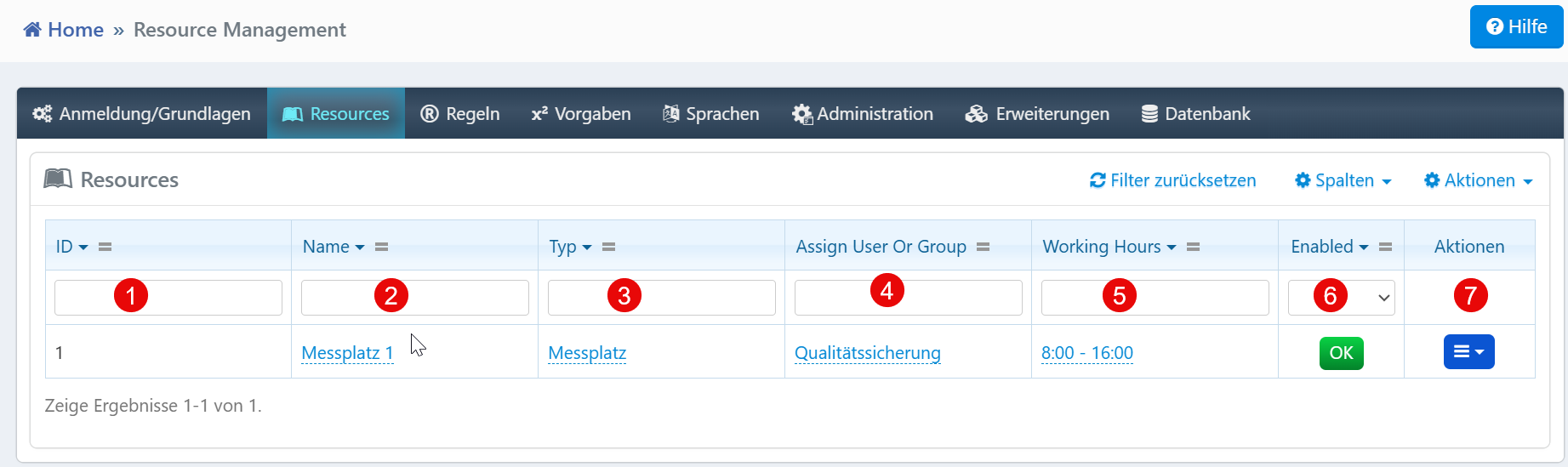
The table shows all resources registered in the system with the following fields:
| Field | Description |
|---|---|
| ID | Unique identification number of the resource. |
| Name | Designation of the workstation, device, or room. |
| Type | Classification (e.g., workstation, test stand). |
| Assign User Or Group | Assigned user or assigned user group. |
| Working Hours | Available working time slots of the resource. |
| Enabled | Activation status of the resource. |
| Actions | View, edit, and delete the resource. |
Create Resource
The Create Resource button opens a form for configuring a new resource. There you define the name, type, responsible users, and working hours.
Notes
- The filter functions above the columns allow targeted searches by resource attributes.
- The Reset Filter button removes all active filters.
- The column menu allows customization of the table view.
- Editing and deleting are only available with sufficient permissions.