Order List
The order list is used for managing, tracking and categorizing orders within the system. It is typically used by employees in purchasing, sales or internal project coordination.
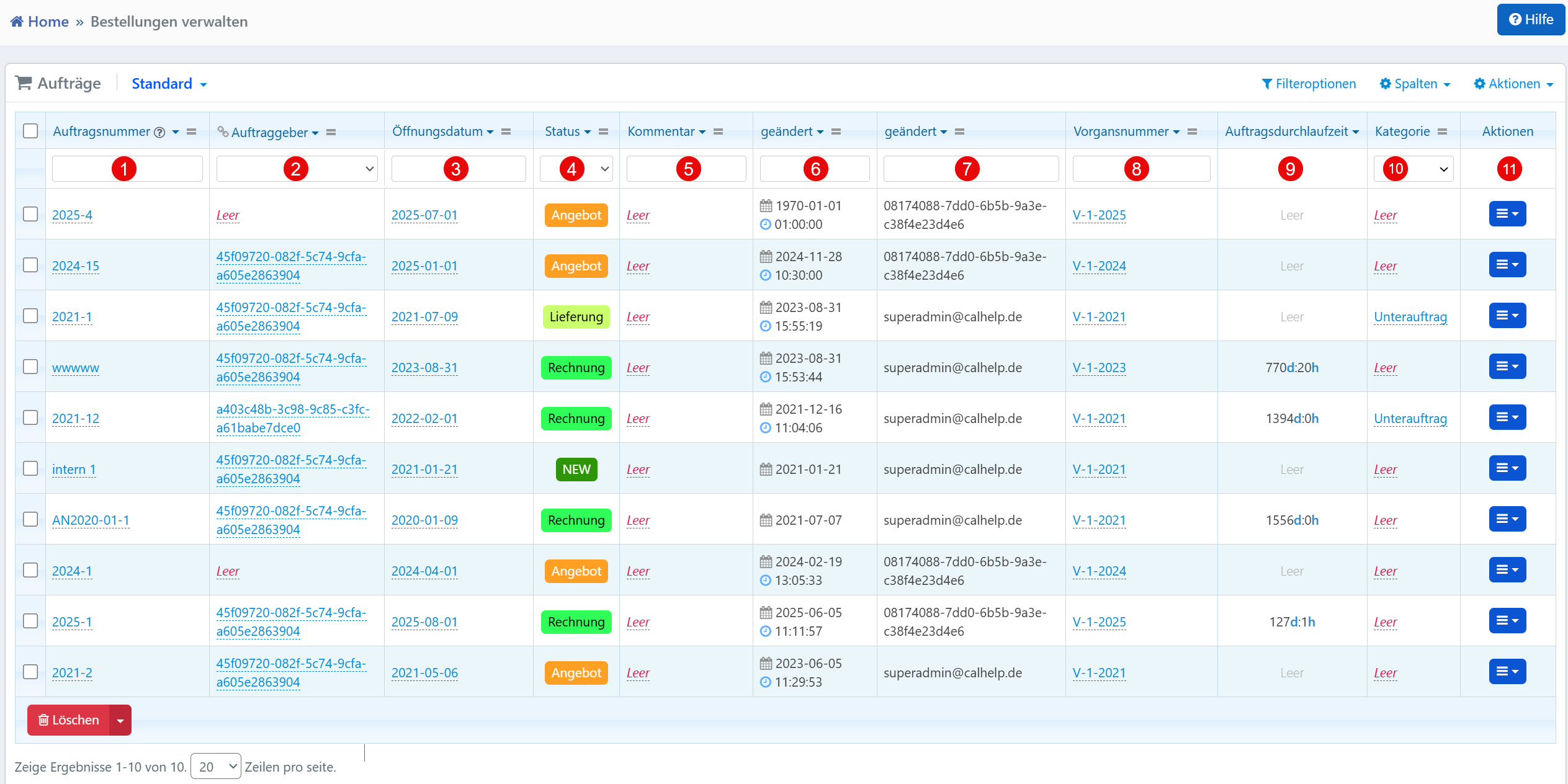
Table View
The filter row above the table allows targeted searching for orders:
| No. | Column | Description |
|---|---|---|
| ① | Order Number | Unique identifier of an order for identification within the system |
| ② | Client | Internal reference ID or user identifier of the ordering customer or department |
| ③ | Opening Date | Date on which the order was created |
| ④ | Status | Current processing state (e.g., Quote, Delivery, Invoice, NEW) |
| ⑤ | Comment | Free-text field for internal notes on the order |
| ⑥ | Modified (Date) | Last timestamp at which changes were made |
| ⑦ | Modified By | User identifier of the person who last edited the order |
| ⑧ | Process Number | Internal or external reference number for assignment to a parent process |
| ⑨ | Order Lead Time | Total time span between creation and completion (format: Days:Hours) |
| ⑩ | Category | Classification of the order (e.g., "Sub-order") |
Status Display
The color coding of the status supports visual orientation:
- Yellow for "Quote"
- Green for "Delivery"
- Blue for "Invoice"
- Light green for "NEW"
The processing duration in the format 127d:1h (Days:Hours) helps with process analysis and optimization.
Action Menu
The following functions are available via the action menu at the end of each row:
- View -- Opens the detail view of the order
- Edit -- Allows modification of order data
- Duplicate -- Creates a copy of the order
- Delete -- Removes the order after a confirmation prompt
Typical Workflows
The "Status" column provides an immediate overview of the current processing state of an order. Through "Modified By", it can be traced who last made changes. Via the "Process Number", orders can be assigned to parent processes or projects. Using "Category", distinctions can be made between main orders, sub-orders or other types.
Note
Orders with empty fields for Comment, Client or Category should be reviewed and completed regularly. The functionality is also suitable for exporting order data for controlling or reporting purposes.