Statistics
Under Administration > Status Management > Statistics, you configure time measurements based on status changes. This allows metrics such as throughput time, processing time, or response time to be calculated automatically.
Statistics Rules
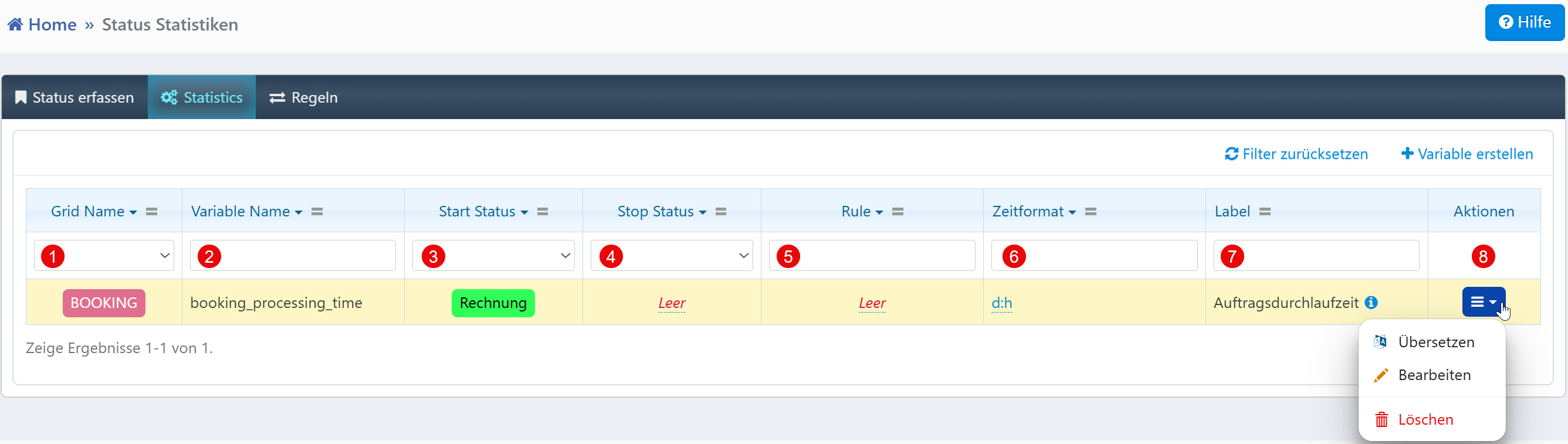
| Field | Description |
|---|---|
| Grid Name | Module for which the statistics rule applies (e.g., BOOKING, SUPPORT_TICKETS). |
| Variable Name | Technical name of the metric for evaluation and export. |
| Start Status | Status from which the time measurement begins. |
| Stop Status | Status at which the time measurement ends. If no stop status is specified, the measurement runs until the current time. |
| Rule | Optional condition to restrict the evaluation. |
| Time Format | Display format of the measured time (e.g., d:h for days:hours, h:m for hours:minutes). |
| Label | Name of the metric in reports and dashboards. |
| Actions | Edit, translate, or delete the rule. |
Typical Use Cases
- Order throughput time: Measurement of time from status "Offer" to "Completed" in the BOOKING module.
- Ticket response time: Measurement from status "New" to "In Progress" for support tickets.
- Calibration duration: Measurement from status "Planned" to "Completed" in the CALIBRATION module.
Notes
- Variable names should be assigned systematically and descriptively (e.g.,
booking_processing_time). - The time format determines the level of detail in reports. Choose
d:hfor longer processes andh:mfor short-term measurements. - The translation function in the action menu enables multilingual labels.