Rules
Under Administration > Status Management > Rules, you define automatic status transitions based on conditions. These rules apply in modules such as INVENTORY or BOOKING and automate workflows, e.g., for deadline exceedances or escalation processes.
Status Rules
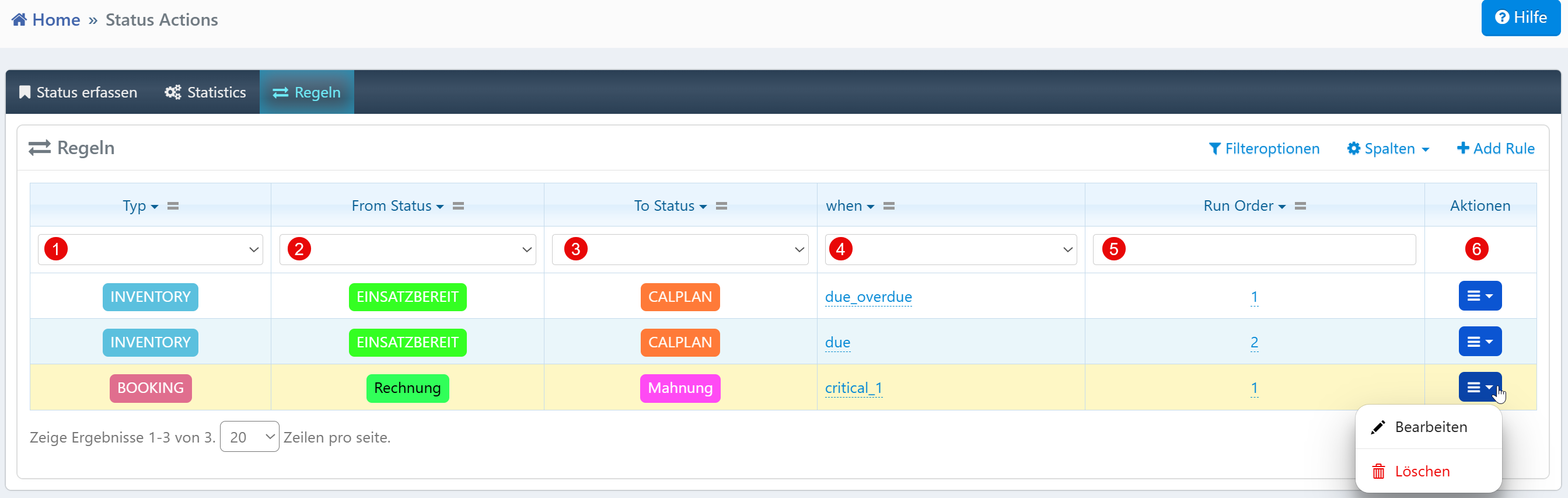
| Field | Description |
|---|---|
| Type | Module in which the rule applies (e.g., INVENTORY, BOOKING). |
| From Status | Source status from which the rule originates. |
| To Status | Target status to which the automatic transition occurs. |
| When | Condition or trigger (e.g., due, due_overdue, critical_1). |
| Run Order | Execution order when multiple rules apply simultaneously. |
| Actions | Edit or delete the rule. |
Examples
- Deadline exceedance in inventory: A device with status
READYautomatically transitions toCALPLANwhen the conditiondue_overdueis met. - Dunning process in orders: A booking with status
Invoiceautomatically transitions toReminderwhen the conditioncritical_1is met. - Escalation for support tickets: Tickets with status
OPENare automatically set toWORKafter a defined deadline.
Notes
- The module type must be compatible with the status values used.
- Rules with a lower Run Order are evaluated first.
- A status change only occurs when the defined condition (
When) applies to the respective record. - Deleting a rule is possible at any time and is recommended when processes change.