Create Maintenance Entry
The "Create Maintenance Entry" form is used for the structured recording of maintenance processes. It combines technical, temporal and organizational information to fully document maintenance processes.
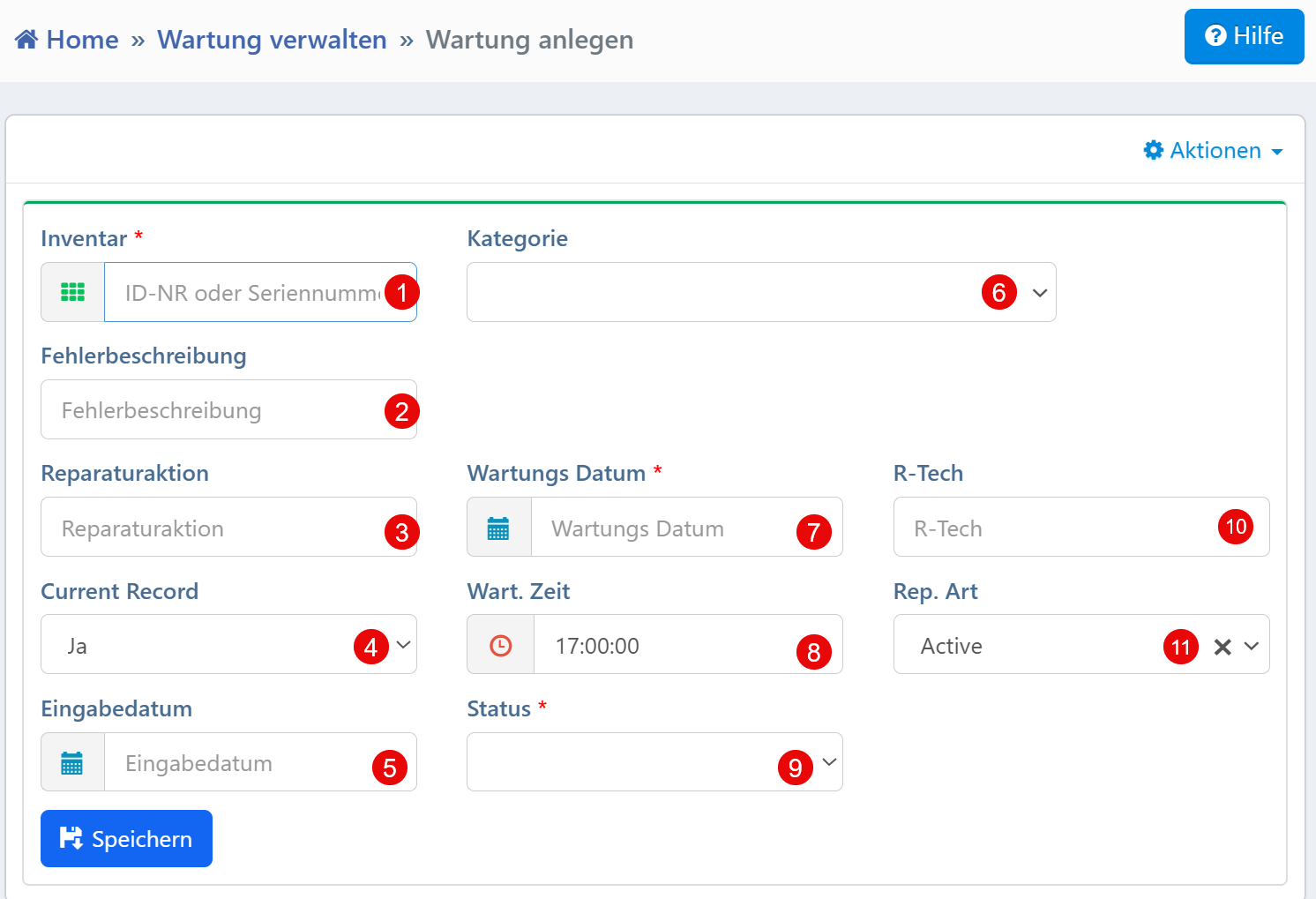
Form Fields
| No. | Field | Description | Required |
|---|---|---|---|
| ① | Inventory | Selection of the device to be maintained by ID or serial number | Yes |
| ② | Fault Description | Free-text field for documenting the observed malfunction | No |
| ③ | Repair Action | Description of the performed or planned measure | No |
| ④ | Current Record | Selection of whether this is the currently valid maintenance entry (Yes/No) | No |
| ⑤ | Entry Date | Time at which the entry was created | No |
| ⑥ | Category | Classification of the maintenance (e.g., calibration, repair, inspection) | No |
| ⑦ | Maintenance Date | Date of execution or scheduled appointment (ISO format YYYY-MM-DD) |
Yes |
| ⑧ | Maintenance Time | Time for more precise scheduling | No |
| ⑨ | Status | Processing status (e.g., open, completed, in progress) | Yes |
| ⑩ | R-Tech | Abbreviation or name of the responsible technician | No |
| ⑪ | Rep. Type | Type of repair measure (e.g., Active, Preventive, Corrective) | No |
Required Fields
The following fields must be filled in to save the entry:
- Inventory -- No entry can be saved without selecting a device
- Maintenance Date -- Date of execution or scheduled appointment in ISO format
- Status -- Current processing state for process control
Typical Workflows
Documenting a completed maintenance: After completing a measure, it is recorded with device, time, fault description and repair action.
Pre-planning a maintenance: For planned maintenance events, an entry with a future maintenance date can be created.
Distinguishing active and historical entries: The "Current Record" field determines whether the entry is currently valid or part of the history.
Adding technical responsibilities: The "R-Tech" and "Rep. Type" fields are used to specify editors and measure types.
Tip
The "Entry Date" field can be set automatically by the system. For multiple maintenance entries per device, a clear regulation via "Current Record" is recommended.