Documents
The document management serves as the central administration of all documented content in the calibration system -- especially certificates, procedures, specifications, and device images. It is an essential tool for DMS managers, quality assurance, and system administration.
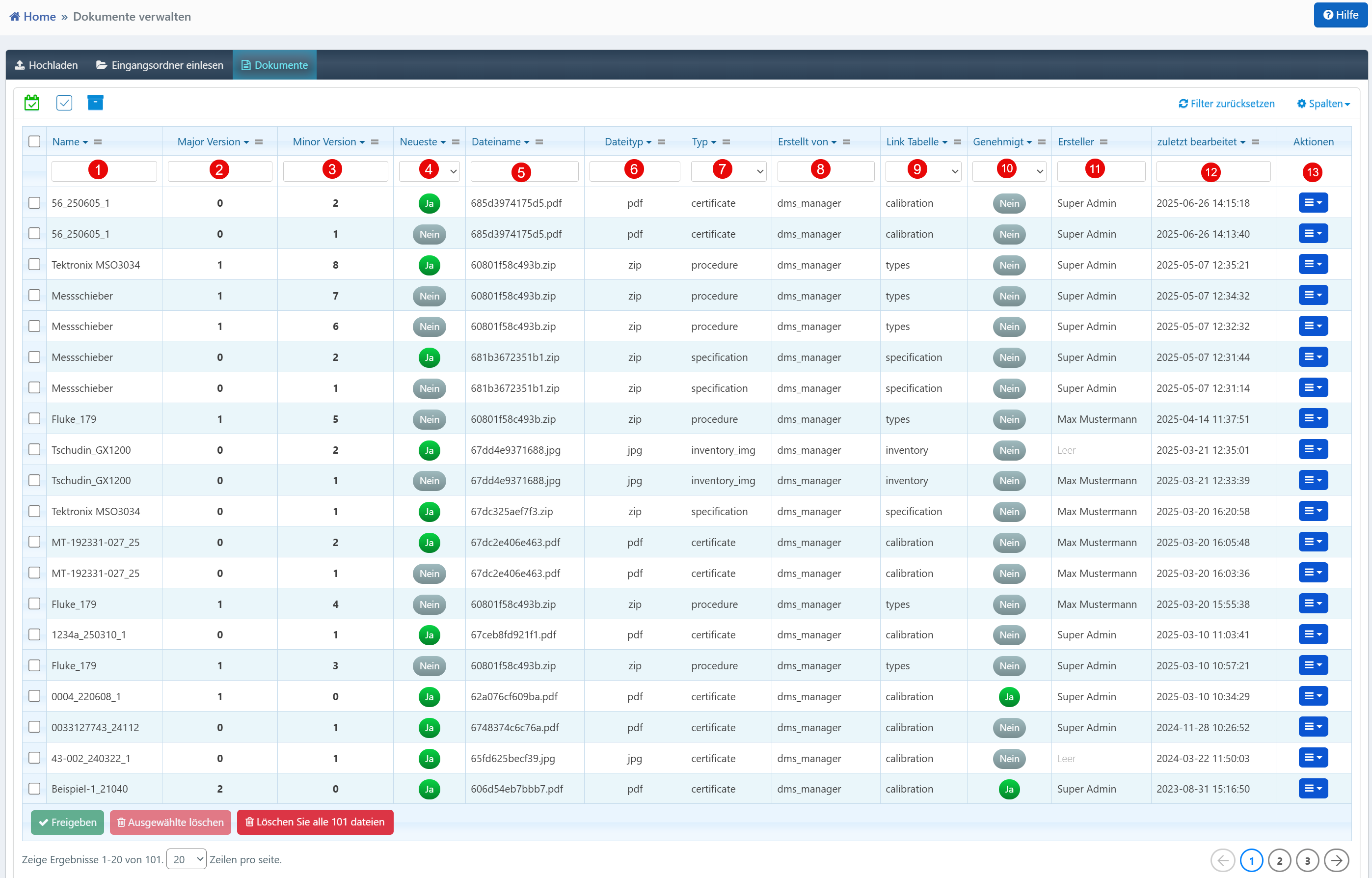

Table View
| No. | Column | Description |
|---|---|---|
| ① | Name | Document name, usually derived from the content or device type |
| ② | Major Version | Major version number, relevant for structural or content changes |
| ③ | Minor Version | Minor version, incremented for smaller adjustments or corrections |
| ④ | Latest | Indicates whether this is the most current version (Yes/No) |
| ⑤ | File name | Actual file name in the file system (including file extension) |
| ⑥ | File type | Format of the document (e.g., PDF, JPG, ZIP) |
| ⑦ | Type | Classification (e.g., "certificate", "procedure", "inventory_img", "specification") |
| ⑧ | Created by | System role or user role that uploaded the document |
| ⑨ | Link Table | Module or database table to which the document is assigned |
| ⑩ | Approved | Approval status for official use (Yes/No) |
| ⑪ | Creator | Username of the uploading person |
| ⑫ | Last modified | Date and time of the last change |
Versioning
The combination of major and minor version enables precise document histories and facilitates audits. Multiple versions of the same document can be managed in parallel in the system until one is approved. The "Latest" field marks the most current version system-side.
Approval Workflow
Documents must be manually approved (column "Approved") before they can be actively used or linked in the system. Documents without approval should not be used in production -- this is often a review step by administrators.
Module Linking
Via "Link Table", the document is directly connected to functional units such as calibrations, specifications, or device types. This linking is crucial for automatic inclusion, e.g., in calibration reports or device documentation.
Action Menu
Via the action menu at the end of each row, documents can be updated, relinked, approved, or deleted.
Note
File types must be valid and compatible with the system (e.g., PDF for certificates, ZIP for procedures, JPG for images). The "Created by" and "Creator" fields provide transparency about who is responsible for which content.