Create Calibration
The form for recording a new calibration is filled out by qualified personnel after the calibration measure has been performed.
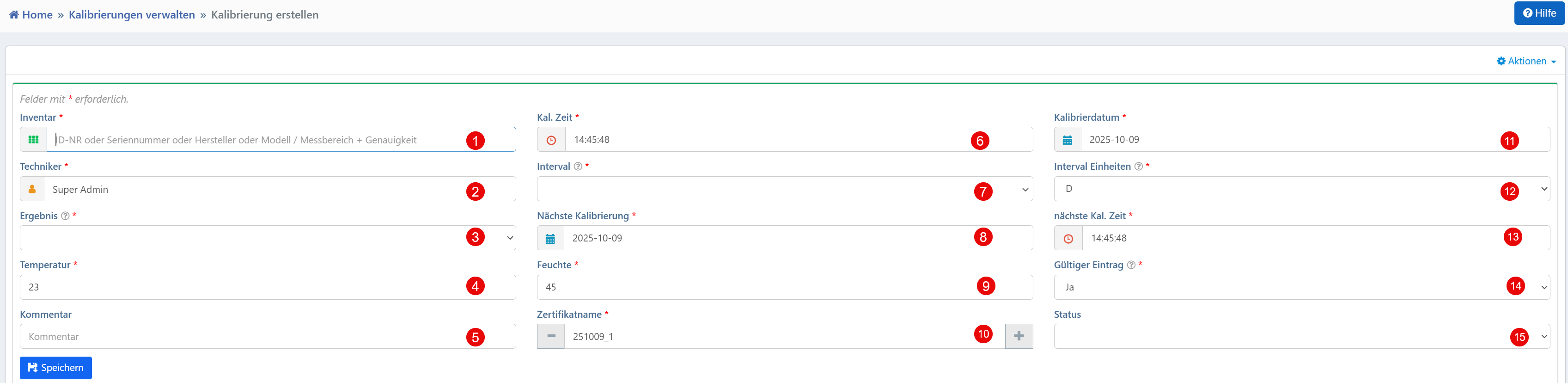

Fields
| No. | Field | Description |
|---|---|---|
| ① | Inventory* | Selection of an inventory object by ID No., serial number, manufacturer, or model. Supports partial term search. |
| ② | Technician* | User performing the calibration. Automatically pre-selected. |
| ③ | Result* | Calibration result ("Y" = passed, "N" = not passed). |
| ④ | Temperature | Ambient temperature in °C during calibration. |
| ⑤ | Comment | Free-text field for supplementary notes. |
| ⑥ | Cal. Time* | Time of calibration. |
| ⑦ | Interval* | Calibration interval as a numeric value. |
| ⑧ | Humidity | Air humidity in % during calibration. |
| ⑨ | Certificate Name | File name of the calibration certificate (without file extension). |
| ⑩ | Add Button | Adds an additional certificate. |
| ⑪ | Calibration Date* | Date of the performed calibration. |
| ⑫ | Interval Units* | Time unit of the calibration interval (D = Days, M = Months). |
| ⑬ | Next Cal. Time | Time of the planned next calibration. |
| ⑭ | Valid Entry* | Indicates whether the calibration is considered valid (Yes/No). |
| ⑮ | Status | Optional status of the calibration (e.g., active, inactive). |
Mandatory fields are marked with *.
Typical Workflows
- Recording After Calibration: After completion, all relevant parameters and environmental conditions are documented.
- Automatic Follow-Up Scheduling: Based on the interval and interval unit, the date of the next calibration is calculated automatically.
- Certificate Assignment: The certificate name is used for subsequent linking with an uploaded calibration certificate. Multiple certificates can be assigned via the Add button.
- Quality Assurance: Mandatory fields such as Valid Entry, Result, and environmental conditions ensure traceability and validity.
Technical Notes
- The Inventory field offers an intelligent search function with suggestions based on partial terms.
- The Interval and Interval Units fields form the basis for automated calibration cycles and reminder functions.
- The Valid Entry field determines whether the calibration is recognized as effective according to internal testing standards.