Article Management
The article management is used for maintaining individual article or service line items, as they are used in quotes, orders or invoices. It is relevant for employees in purchasing, sales or controlling.
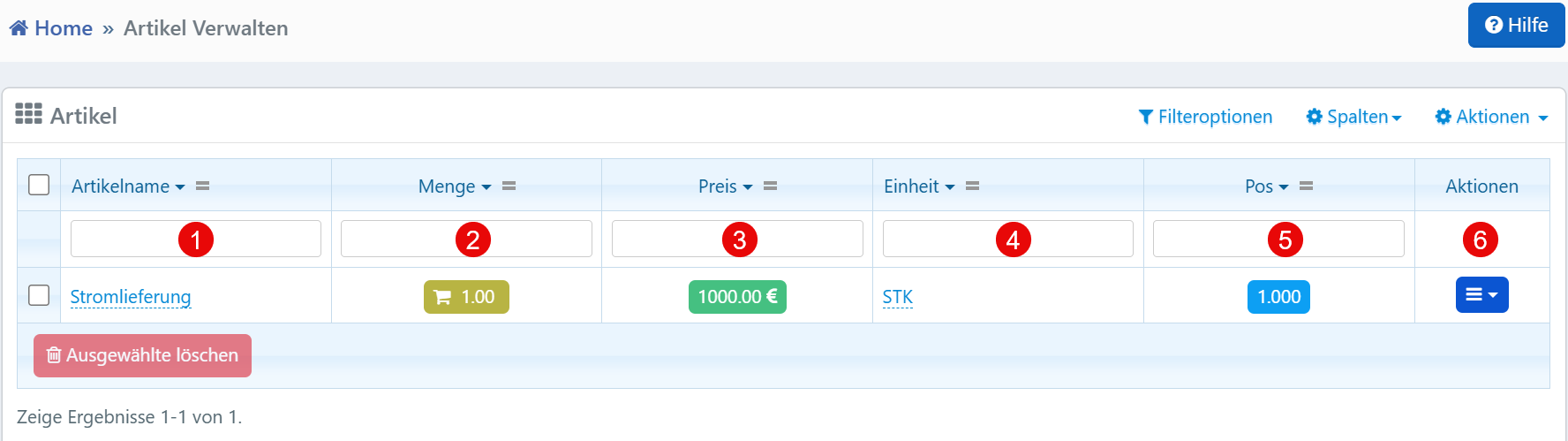
Table View
The filter row above the table allows targeted searching for articles:
| No. | Column | Description |
|---|---|---|
| ① | Article Name | Designation of the article or service in the system |
| ② | Quantity | Number or volume of the article |
| ③ | Price | Price per unit in the respective currency |
| ④ | Unit | Unit of measure of the article (e.g., PCS, KG, h) |
| ⑤ | Pos | Position number within an order or invoice |
Action Menu
The following functions are available via the action menu at the end of each row:
- Edit -- Opens the editing mask for the article
- Duplicate -- Creates a copy of the article
- Delete -- Removes the article after a confirmation prompt
Typical Workflows
Creating and maintaining article positions: New articles can be recorded or existing ones updated (e.g., price change, quantity adjustment).
Use in orders or invoices: Articles are linked as positions in transactions and serve for calculation and billing.
Position logic: The "Pos" column defines the sorting or billing order in a document.
Note
Prices are to be interpreted as gross or net depending on the system setting. Units should be used consistently system-wide, as they are also used in reports and automated evaluations. The combination of article name, quantity, price and unit forms the basis for the position total calculation.