Upload Files
The upload module is used for structured uploading of files into specific target folders within the document management system. It supports workflows where documents are first uploaded to inbox folders and then automatically processed.
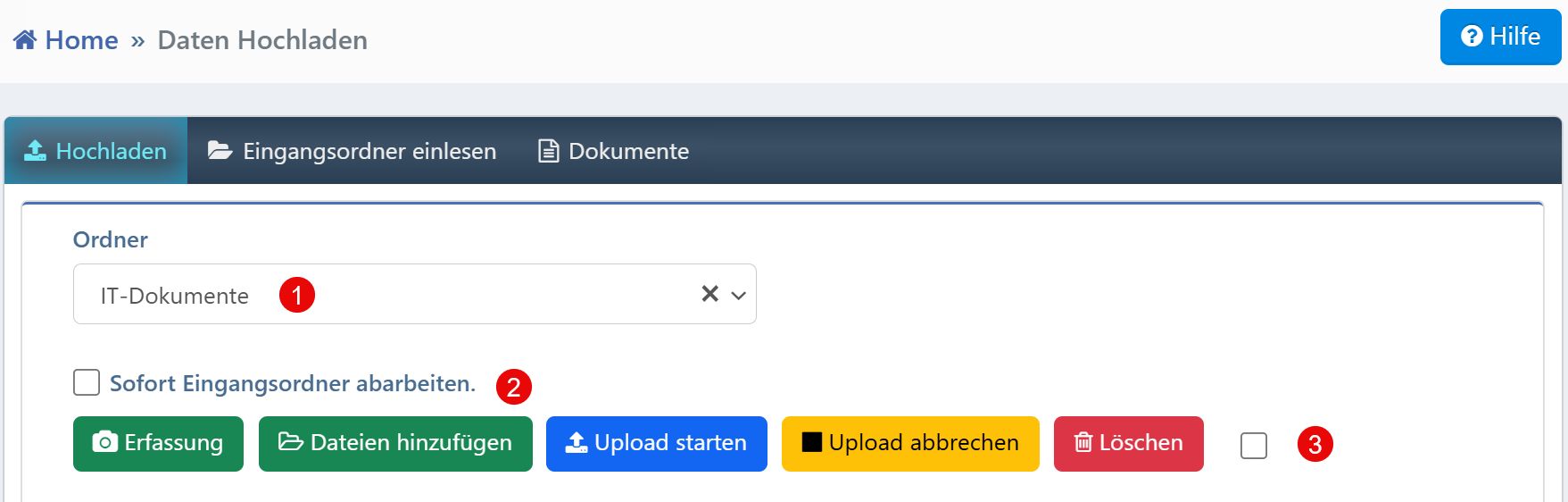

Upload Area
| No. | Element | Description |
|---|---|---|
| ① | Folder selection | Selection of the target folder for the files to be uploaded (required field) |
| ② | Process inbox immediately | Checkbox to activate immediate further processing after upload |
| ③ | Checkbox for multiple selection | Selection of individual files for targeted deletion or editing |
Folder Selection
Without selecting a target folder, the upload cannot be started. The available folders are loaded from a central configuration and may be restricted based on roles.
Immediate Processing
By activating the "Process inbox immediately" checkbox, it is ensured that after uploading, the linked processing workflows are automatically triggered (e.g., pattern recognition, categorization, archiving). This option is suitable for standard documents that do not require manual review.
Upload Controls
The following buttons are available:
- Capture -- Capture via camera (e.g., on mobile devices)
- Add files -- Selection of files from the local file system
- Start upload -- Starts the actual upload process
- Cancel upload -- Cancels the ongoing upload
- Delete -- Removes selected files before upload
Note for administrators
Folder access and upload permissions should be clearly defined, especially for sensitive document types. System-side limitations (e.g., file size, file types) should be transparently communicated in the interface. Upload operations are fully logged.