Create Order
The order creation form is used for the structured recording of new orders. It is used in purchasing, sales and project execution processes to fully document all relevant data for a transaction.
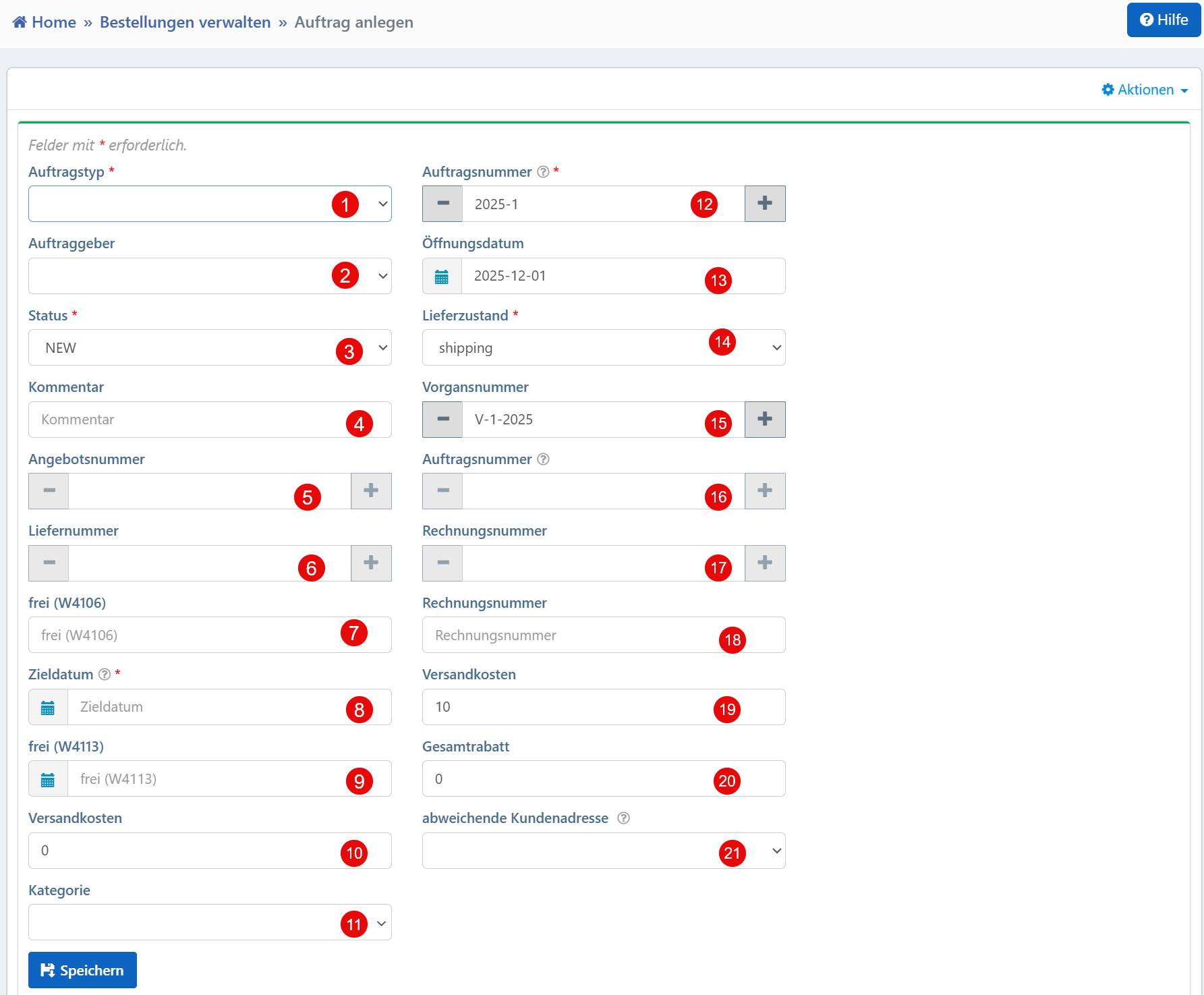
Form Fields
| No. | Field | Description | Required |
|---|---|---|---|
| ① | Order Type | Definition of the type (e.g., purchase order, internal request, delivery) | No |
| ② | Client | Selection of the customer or organization | No |
| ③ | Order Number | Unique identification of the order | Yes |
| ④ | Opening Date | Date of order creation | No |
| ⑤ | Status | Initial processing status (e.g., "NEW") | No |
| ⑥ | Comment | Free-text field for additional notes | No |
| ⑦ | Quote Number | Assignment of a quote number as reference | No |
| ⑧ | Delivery Number | Internal or external identifier for the associated delivery | No |
| ⑨ | Target Date | Date by which the service or delivery should be completed | Yes |
| ⑩ | Shipping Costs | Recording of additional shipping costs | No |
| ⑪ | Category | Classification of the order (e.g., "Sub-order", "Project Order") | No |
| ⑫ | Delivery Condition | Selection field for the planned delivery mode | No |
| ⑬ | Process Number | Reference number for assignment to a parent business process | No |
| ⑭ | Invoice Number | Input field for the associated invoice number | No |
| ⑮ | Total Discount | Percentage discount on the total order | No |
| ⑯ | Alternate Customer Address | Field for storing an address different from the default | No |
Additionally, user-defined date fields (e.g., W4106, W4113) are available for customer- or company-specific additional data.
Required Fields
The following fields must be filled in to save the order:
- Order Number -- Unique identification of the order
- Target Date -- Date by which the service or delivery should be completed
Typical Workflows
New order intake: Incoming orders are recorded with type, client, target date and order number.
Linking with existing processes: Previous phases can be referenced via quote number and process number.
Calculation and logistics: Shipping costs, discount and delivery condition enable a complete price and process representation.
Tip
The arrow buttons next to fields like quote, delivery or invoice number are used for inserting additional references or clearing them. The dual fields for order and invoice numbers enable compatibility with external systems or multiple references.