Email Management
Under Administration > Email Management, you control all email communication of the system. The module includes Actions, Mailbox, Templates, SMTP Configurations, Logging, and manual email sending.
Actions
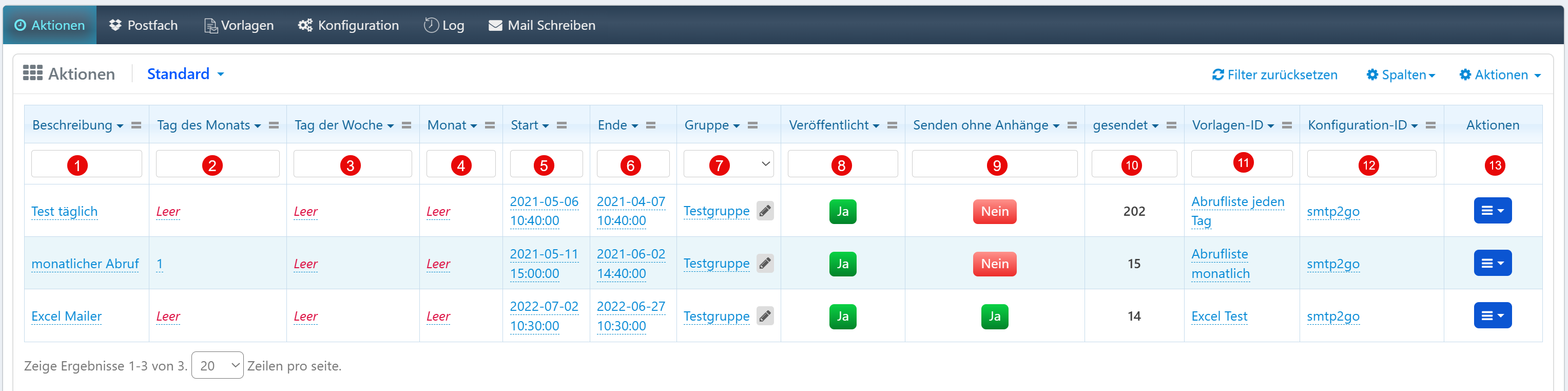
Scheduled actions trigger automatic email dispatches, report generations, or workflow steps.
| Field | Description |
|---|---|
| Description | Short name of the action. |
| Day of Month | Day of the month when the action is executed. |
| Day of Week | Weekday for execution. |
| Month | Month(s) for execution. |
| Start / End | Time window in which the action is active. |
| Group | Assignment to a user group. |
| Published | Only active actions (Yes) are executed. |
| Send without Attachments | Controls whether the action is triggered even without a file attachment. |
| Sent | Number of dispatches so far. |
| Template ID | Linked email or report template. |
| Configuration ID | Assigned SMTP configuration. |
| Actions | Edit, duplicate, delete. |
Mailbox
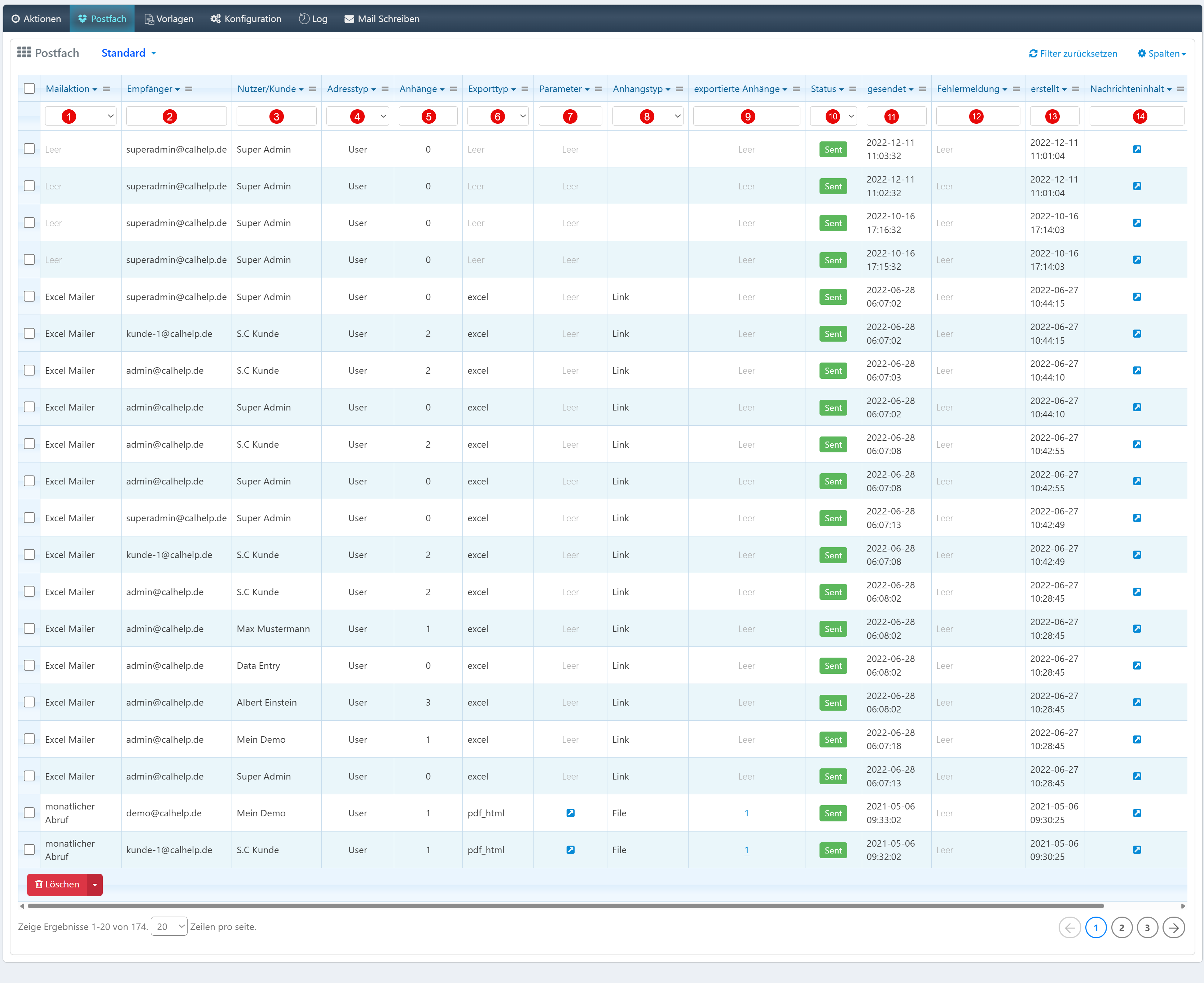
The mailbox logs all outgoing emails with metadata for tracking.
| Field | Description |
|---|---|
| Mail Action | Triggering action or process. |
| Recipient | Email address of the recipient. |
| User/Customer | Affiliation of the recipient (role, customer group). |
| Address Type | Type of address (User, System, Distribution Group). |
| Attachments | Number of file attachments. |
| Export Type | Export format (e.g., excel, pdf_html). |
| Parameter | Additional information about the email. |
| Attachment Type | Type of attachment (Link, File). |
| Status | Delivery status (e.g., Sent). |
| Sent | Dispatch timestamp. |
| Error Message | Error description for delivery problems. |
| Created | Creation timestamp of the entry. |
| Message Content | Access to the email content. |
Templates
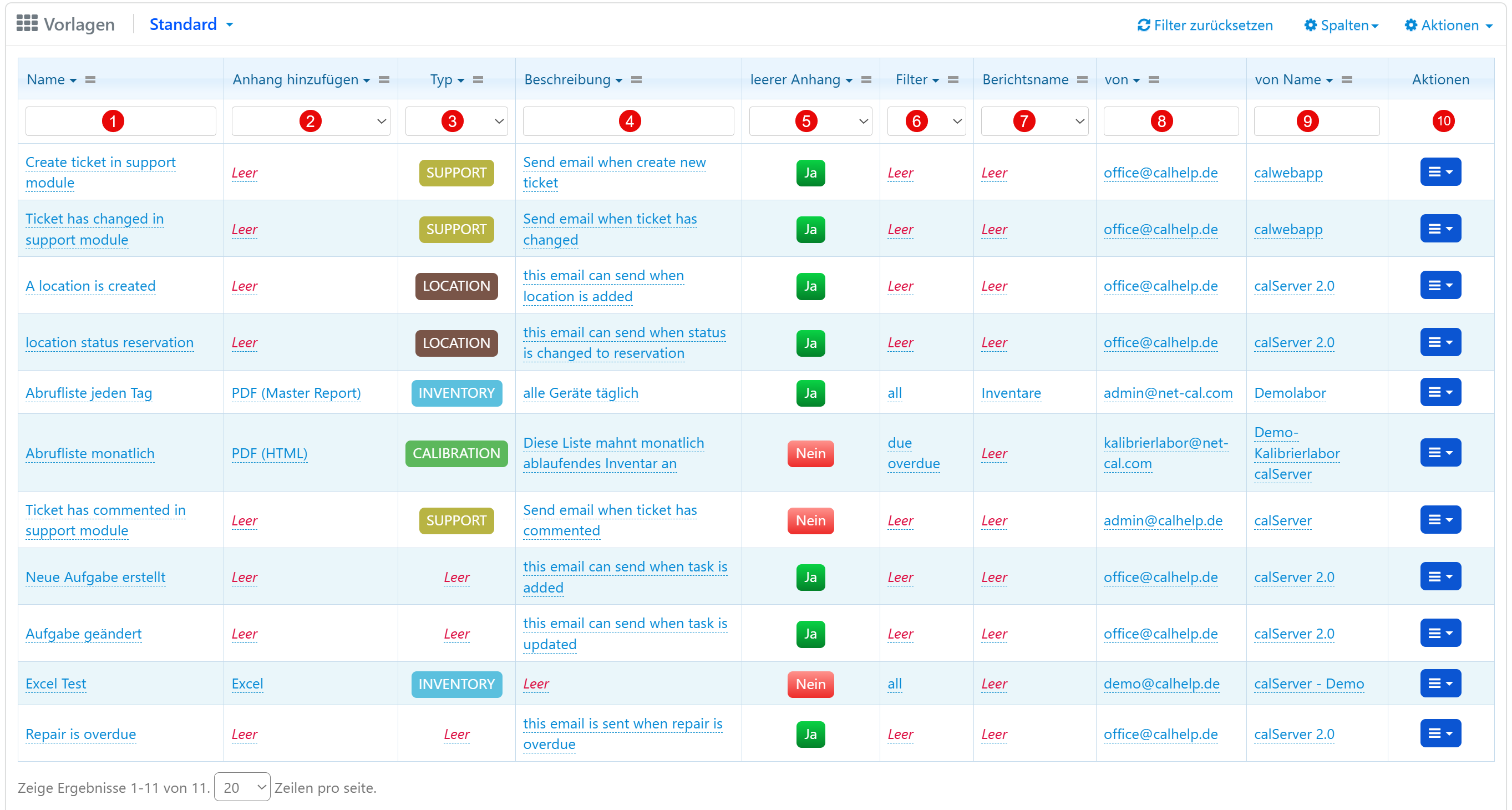
Email templates define content and attachments for automated and manual emails.
| Field | Description |
|---|---|
| Name | Name of the template. |
| Add Attachment | Default attachment of the template. |
| Type | Purpose (e.g., SUPPORT, INVENTORY, LOCATION). |
| Description | Explanation of the template. |
| Empty Attachment | Template usable without attachment (Yes/No). |
| Filter | Optional filter criteria (e.g., "all", "due overdue"). |
| Report Name | Associated report. |
| From / From Name | Sender address and name. |
| Actions | Edit, duplicate, delete. |
Tip
Templates can be maintained in multiple languages to ensure internationally consistent communication.
Configuration
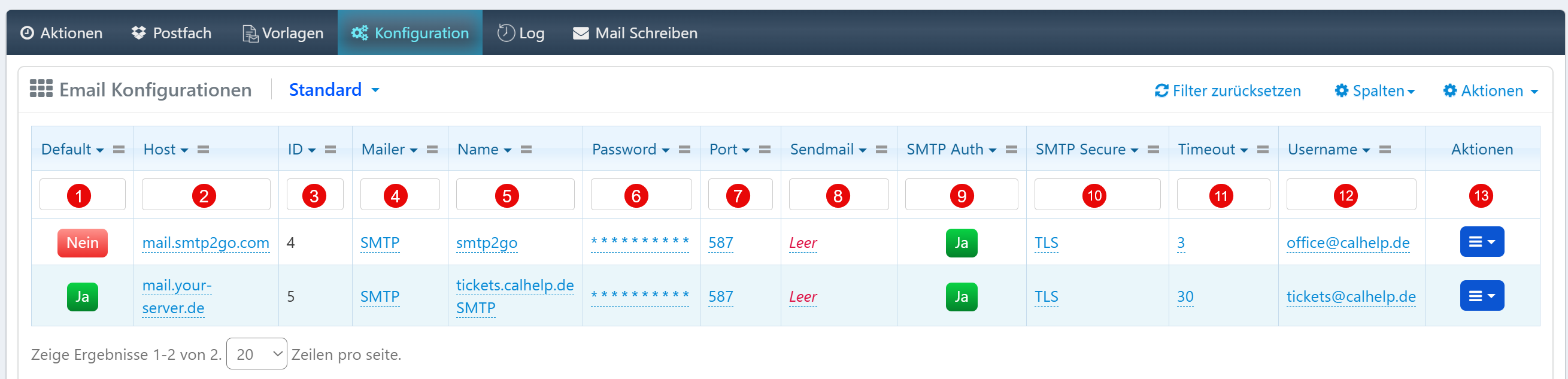
Here you manage the SMTP connections for email delivery.
| Field | Description |
|---|---|
| Default | Identifies the default configuration. |
| Host | SMTP server address. |
| ID | Unique identification number. |
| Mailer | Type of mail service (e.g., SMTP). |
| Name | Name of the configuration. |
| Password | Password for SMTP authentication. |
| Port | Port number (usually 587 for TLS). |
| SMTP Auth | SMTP authentication required (Yes/No). |
| SMTP Secure | Encryption type (TLS, SSL, none). |
| Timeout | Time limit for the delivery attempt in seconds. |
| Username | Username for the mail server. |
| Actions | Edit, duplicate, delete. |
Warning
Only one configuration can be defined as Default. This is used for all delivery actions not explicitly assigned.
Log
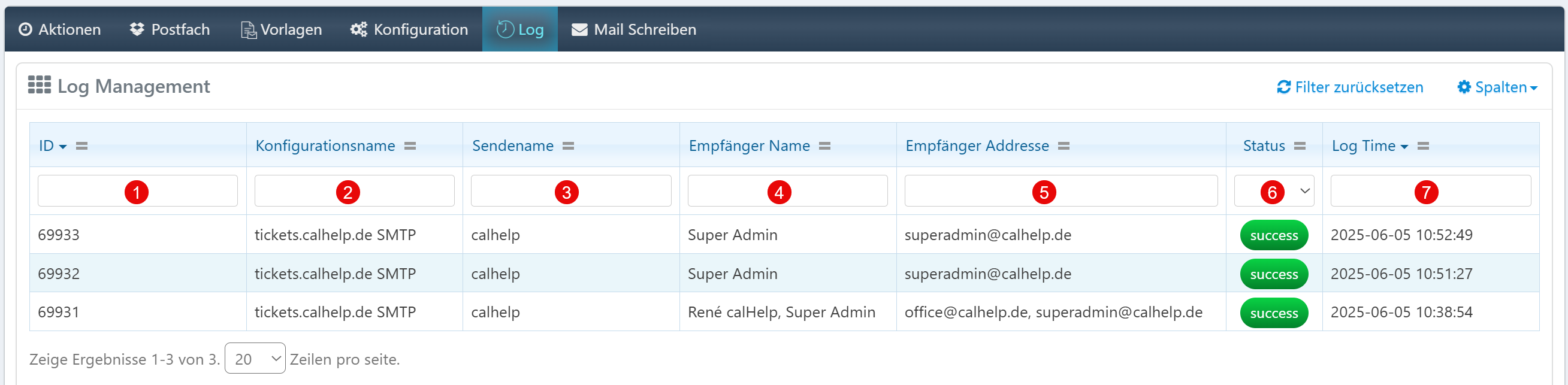
The log records all email delivery operations:
| Field | Description |
|---|---|
| ID | Unique log identification number. |
| Configuration Name | SMTP configuration used. |
| Sender Name | Sender name during delivery. |
| Recipient Name | Display name of the recipient. |
| Recipient Address | Email address of the recipient. |
| Status | Delivery status (e.g., success). |
| Log Time | Timestamp of the delivery operation. |
Compose Email
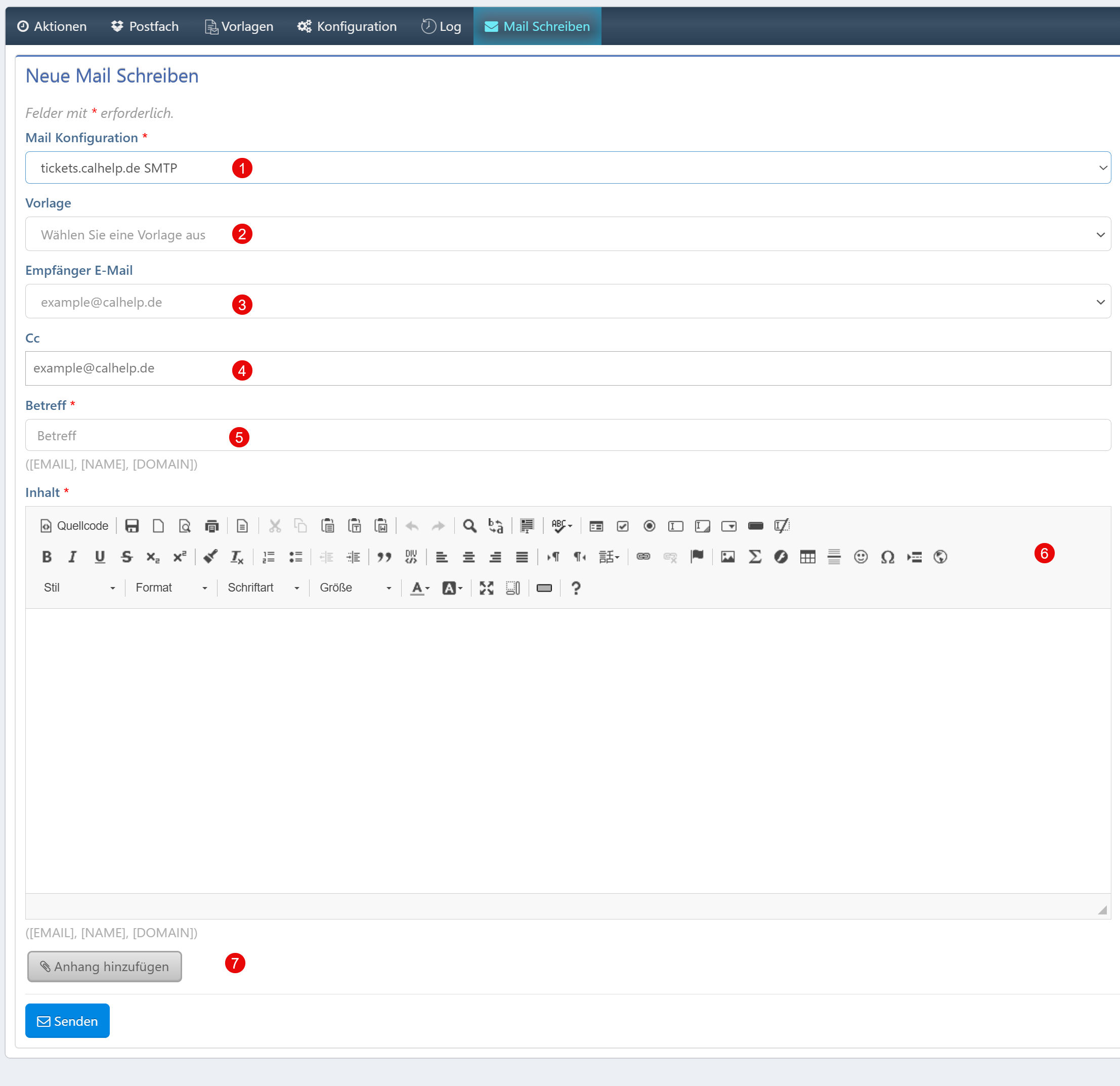
The form enables manual email sending directly from the system.
| Field | Description |
|---|---|
| Mail Configuration | Selection of the SMTP configuration. |
| Template | Optional selection of an email template. |
| Recipient Email | Destination address of the message. |
| Cc | Additional recipients (Carbon Copy). |
| Subject | Subject line (required field). |
| Content | HTML editor for composing the message text. |
| Add Attachment | Attach file attachments. |