Create Price
The price creation form is used for the structured entry of new price records. Prices are assigned to individual product types with commercial parameters such as costs, quantities, units, tax, and price groups.
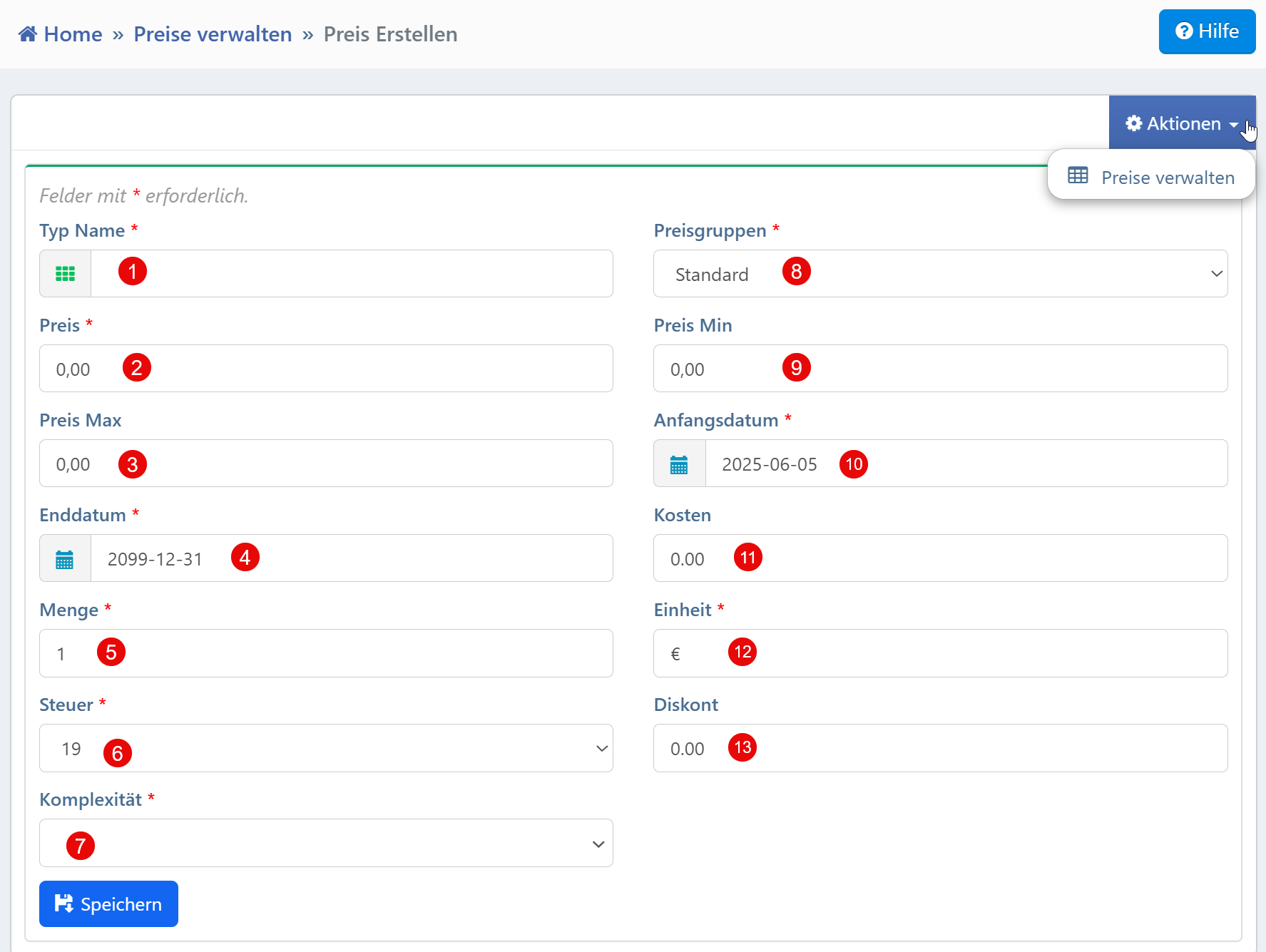
Form Fields
| No. | Field | Description | Required |
|---|---|---|---|
| ① | Type Name | Selection of the product type for which the price is defined | Yes |
| ② | Price | Definition of the main price | Yes |
| ③ | Price Min | Minimum allowable price (e.g., for discount limits) | No |
| ④ | Price Max | Maximum possible price in a price scale | No |
| ⑤ | Start Date | Start date of the price validity (ISO format) | Yes |
| ⑥ | End Date | End date of the price validity (ISO format) | Yes |
| ⑦ | Quantity | Standardized reference quantity (e.g., 1 piece) | Yes |
| ⑧ | Tax | Applicable VAT rate in percent | Yes |
| ⑨ | Complexity | Categorization of the price structure (e.g., simple, medium, high) | Yes |
| ⑩ | Price Groups | Assignment to a price group (e.g., Standard, Premium) | Yes |
| ⑪ | Cost | Internal cost value for price calculation | No |
| ⑫ | Unit | Currency or unit of measure (e.g., EUR, USD, kg) | Yes |
| ⑬ | Discount | Optional deduction in absolute values from the base price | No |
Required Fields
All fields marked with an asterisk (*) must be filled in to save the entry. Date fields require a valid ISO date (YYYY-MM-DD), numeric fields expect decimal numbers in the format 0.00.
Typical Workflows
Creating new product prices: When initially recording a product or expanding the range, a new price is created with all required parameters.
Defining tiered prices: By combining Price, Price Min/Max, and Discount, flexible pricing structures can be configured.
Assignment to price groups: The "Price Groups" field allows differentiation by target groups (e.g., B2B, B2C).
Calculation basis for reporting: The "Cost" and "Tax" fields enable a clean separation between net and gross values for accounting and controlling.
Tip
The system can work with default values, e.g., standard tax rate, standard unit, or automatically populated end date. The editing of certain fields (e.g., Discount, Cost) may be restricted based on roles.