Locations
The location creation form is used to assign an inventory object to a customer location. Relevant information such as customer reference, time period, responsible persons as well as optional address and shipping data are recorded.
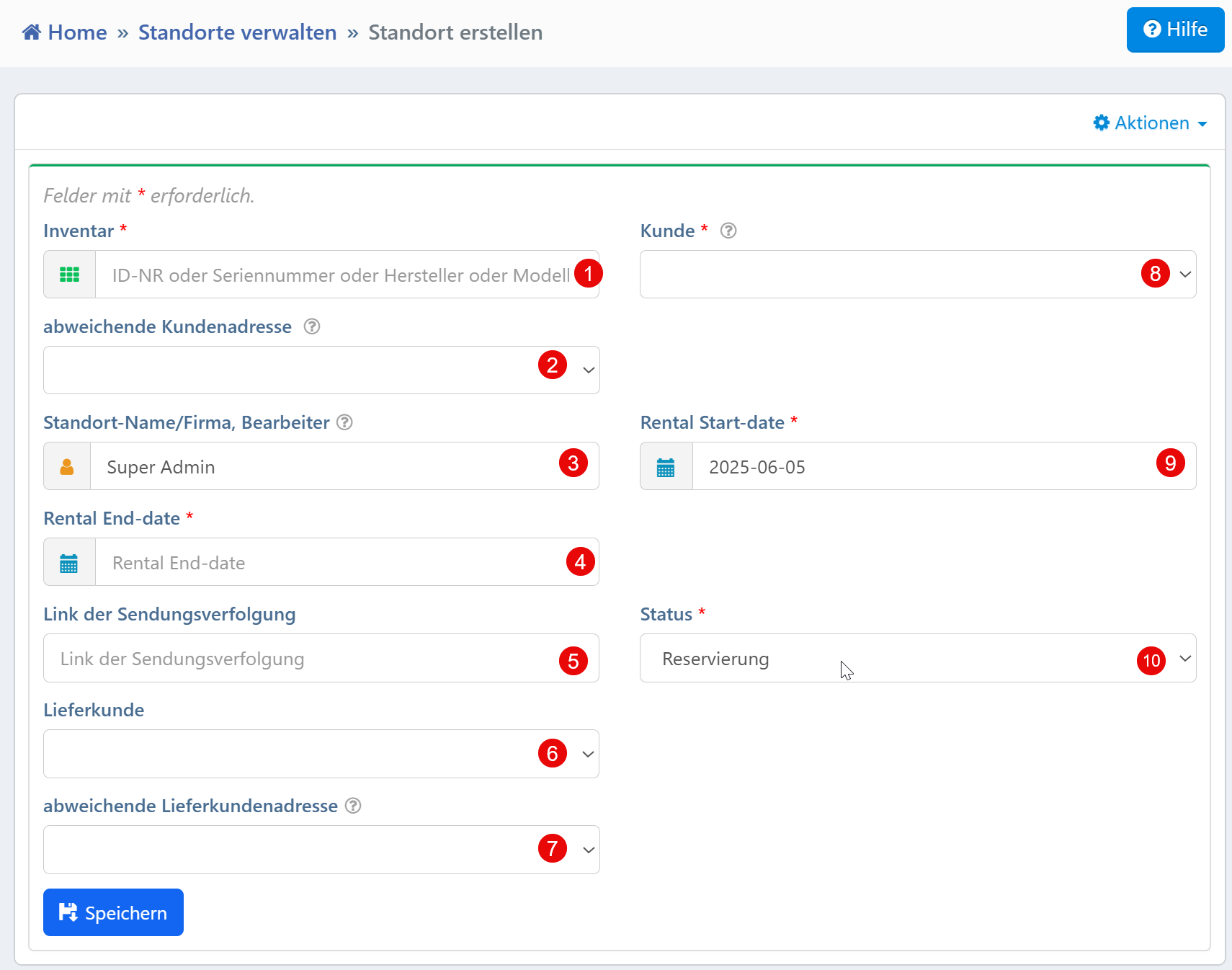
Form Fields
| No. | Field | Description | Required |
|---|---|---|---|
| ① | Inventory | Selection of the device by ID, serial number or model designation | Yes |
| ② | Customer | Selection of the associated customer | Yes |
| ③ | Rental Start-date | Date from which the object is assigned to the location (ISO format) | Yes |
| ④ | Rental End-date | Date on which the location assignment ends (ISO format) | Yes |
| ⑤ | Status | State of the assignment (e.g., reservation, active, ended) | Yes |
| ⑥ | Alternate Customer Address | Optional selection of a customer address different from the main address | No |
| ⑦ | Location Name/Company, Editor | Automatically set or selectable location manager | No |
| ⑧ | Shipment Tracking Link | Input field for a tracking link to follow the delivery | No |
| ⑨ | Delivery Customer | Selection field for assigning a different recipient | No |
| ⑩ | Alternate Delivery Customer Address | Optional address field for specifying a delivery address | No |
Required Fields
The following fields must be filled in to save the entry:
- Inventory -- Central selection of an object by ID, serial number or model
- Customer -- Selection of a system-wide registered customer
- Rental Start-date and End-date -- Define the time period of the location assignment (ISO format
YYYY-MM-DD) - Status -- Indicates the state of the location relationship, relevant for downstream processes
Typical Workflows
New rental assignment: A device is assigned to a customer location for the first time, e.g., for a loan, a project or a test setup.
Reservation before shipment: The "Reservation" status allows a pre-booking without an immediate deployment.
Specifying shipping details: The "Shipment Tracking" and "Alternate Delivery Address" fields are used to add logistical information.
Managing alternate addresses: Customer and delivery addresses that differ from the system suggestion can be selected, e.g., for external warehouses or construction sites.
Tip
The status can be automatically changed by follow-up processes (e.g., shipment confirmation). The address selection fields access the central address module -- changes there take effect system-wide.
Your own location values instead of customer selection
The form above is built around an external recipient: customer, contact person, delivery customer. If you do not lend out devices but manage them internally, none of that applies. For you a location is a place on your own site: Plant 2, Hall 3, Test bench 14.
This can be set up without an extra module. Field ⑦ "Location" (L2802) is
switched from free text to a curated option list in
field management, and the customer fields are
hidden.
Setting it up
- Open field management and select the Location data area (
location). - On the "Location" field (
L2802), set Field Category toPickList. - Enter your own places as field options. The format is
key:label, entries separated by#:
The key is stored, the label is displayed.
4. Hide the fields you do not need: ② Customer, ⑥ alternate customer address,
⑨ delivery customer, ⑩ alternate delivery address.
5. Optionally switch "Department" (L2803) and "Station" (L2804) the same
way if you need a second level.
From then on the form offers a selection instead of a text field, and grid filters match reliably because every row carries the same key.
Limits
The option list is a string in the field configuration, not a master data record:
- No hierarchy. "Plant 2" will not find the devices in "Plant 2 / Hall 3". If you want to report per plant, choose meaningful keys and filter on the leading characters.
- No address on the place. Delivery notes fall back to the tenant address.
- 36 characters for key and value combined.
- Only the label can be renamed safely. Changing a key leaves existing rows showing the old value and dropping out of the selection. Pick stable keys from the start.
For small, flat lists of places this is the right solution.
When migrating to V2
The location values themselves carry over in full. The option list of this field currently does not: after the migration, "Location" starts out as free text again in V2. Re-enter the list once in V2 field management afterwards; existing values are preserved. Saving the list before the migration spares you the retyping.