Price Groups
The price group management enables the structuring and maintenance of differentiated pricing models. Price groups segment prices by customer types, markets, or other criteria and define pricing frameworks for a variety of products.
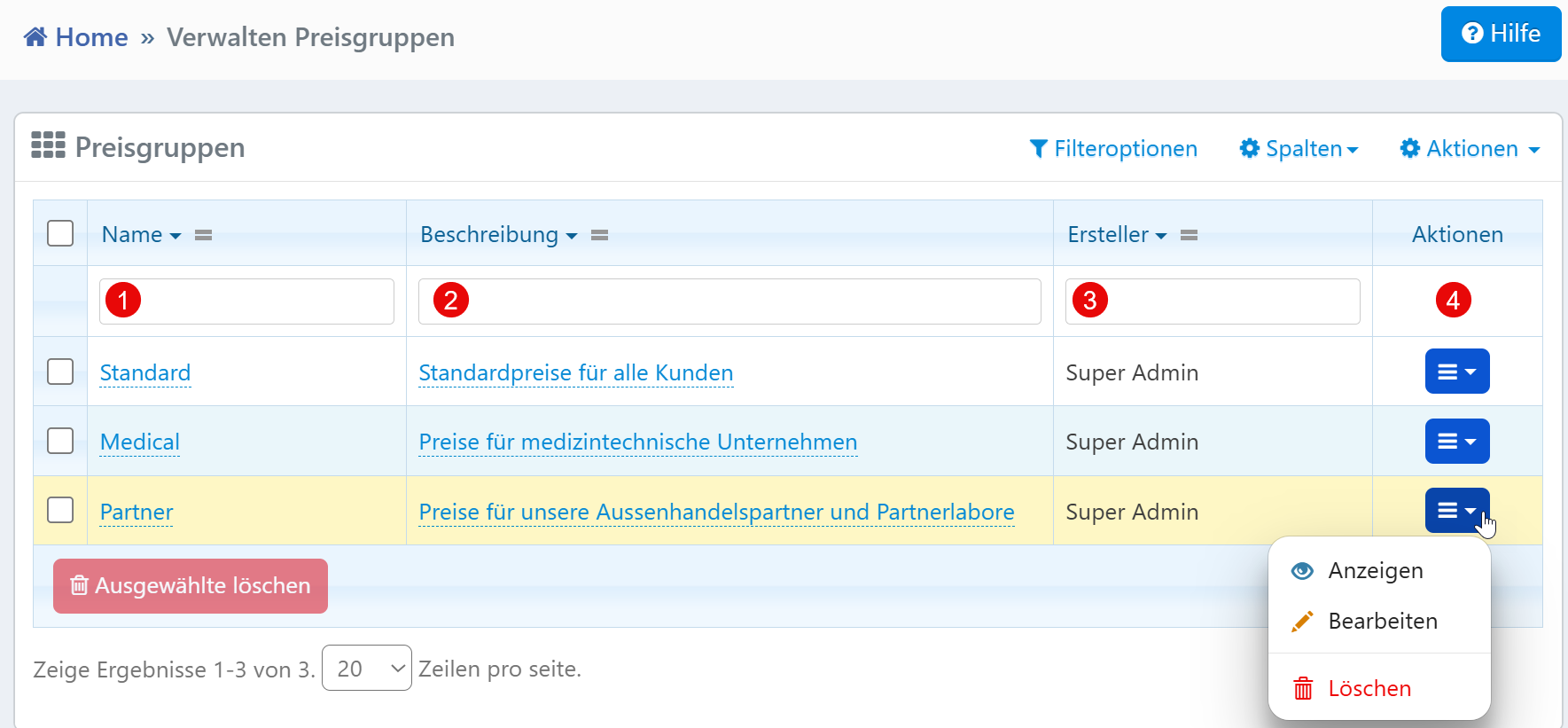
Table View
| No. | Column | Description |
|---|---|---|
| ① | Name | Name of the price group (e.g., "Standard", "Medical", "Partner") |
| ② | Description | Explanation or additional information about the price group |
| ③ | Creator | Name of the user who created the price group |
Filter Functions
All filter fields take effect immediately on the table. Partial terms also yield results. Filter fields can be combined, e.g., "Description contains 'Partner'" and "Creator is 'Admin'".
Action Menu
The following functions are available via the action menu at the end of each row:
- View -- Opens the price group in a read-only detail view
- Edit -- Opens an input form where the name and description can be changed
- Delete -- Permanently removes the price group after a confirmation prompt (only possible if the group is no longer in use)
Typical Workflows
Finding specific price groups: Using the filter row, specific groups can be found by their name, description, or creator.
Maintaining groups: Price groups are adjusted or removed as needed, e.g., during restructuring of customer segments.
Systematic expansion: New groups can be created in parallel, and existing ones can be consistently supplemented through adjustment or duplication.
Note for Administrators
Before deleting, it should be verified whether the price group is linked to product prices or rules. A clean naming convention (e.g., "B2B_Standard", "Medical_Export") facilitates later filtering and reporting.