Procedures
The procedure management is used for maintaining standardized calibration procedures. It is intended for administrators and quality managers who ensure that calibrations are performed according to traceable and standard-compliant methods.
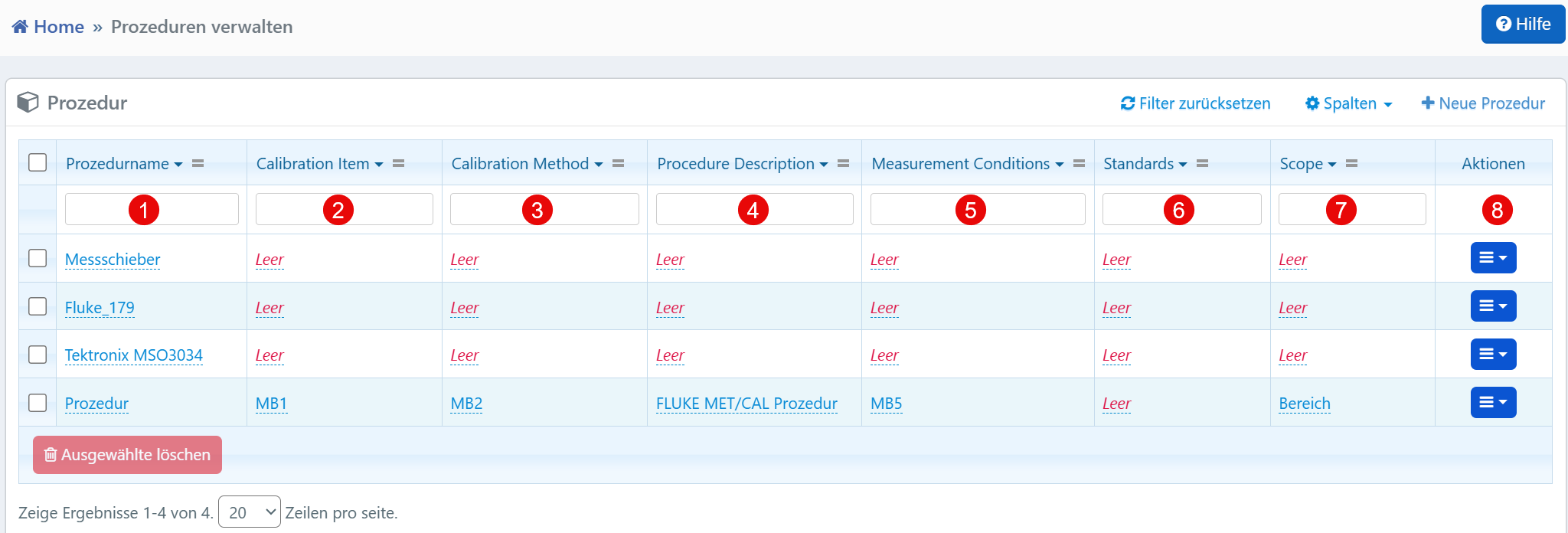
Columns
| No. | Column | Description |
|---|---|---|
| ① | Procedure Name | Designation of the calibration procedure for identification in the system. |
| ② | Calibration Item | Device or technical object to which the procedure applies. |
| ③ | Calibration Method | Method used to perform the calibration. |
| ④ | Procedure Description | Description of the approach within the procedure. |
| ⑤ | Measurement Conditions | Environmental conditions during calibration (e.g., temperature, humidity). |
| ⑥ | Standards | Reference standards or guidelines on which the procedure is based. |
| ⑦ | Scope | Scope of applicability of the procedure. |
| ⑧ | Actions | Action menu for editing, duplicating, or deleting the procedure. |
Typical Workflows
- Create New Procedure: A new calibration procedure with all relevant information can be created via the "New Procedure" button.
- Assignment to Devices: Procedures can be assigned to devices (Calibration Items) and automatically suggested during calibration.
- Maintain Existing Procedures: Entries can be edited or removed via the action menu.
Technical Notes
- Empty entries in the columns Calibration Item through Scope should be regularly completed to ensure consistency and standard compliance.
- Links to external calibration files (e.g., FLUKE MET/CAL procedures) enable the integration of automated workflows.
- The Standards field should reference standards such as ISO 17025, VDI/VDE guidelines, or internal factory standards.
- Scope serves to define which device types or application areas the procedure applies to.