Support Ticket System
The support ticket system is used for the structured entry, processing, and tracking of internal reports -- e.g., bug reports, complaints, or management notes. It comprises two sub-areas:
- My Reports -- Overview of existing reports
- New Report -- Entry of new reports
My Reports
The report overview displays all recorded reports in a filterable table and supports prioritized processing, documentation, and risk assessment.
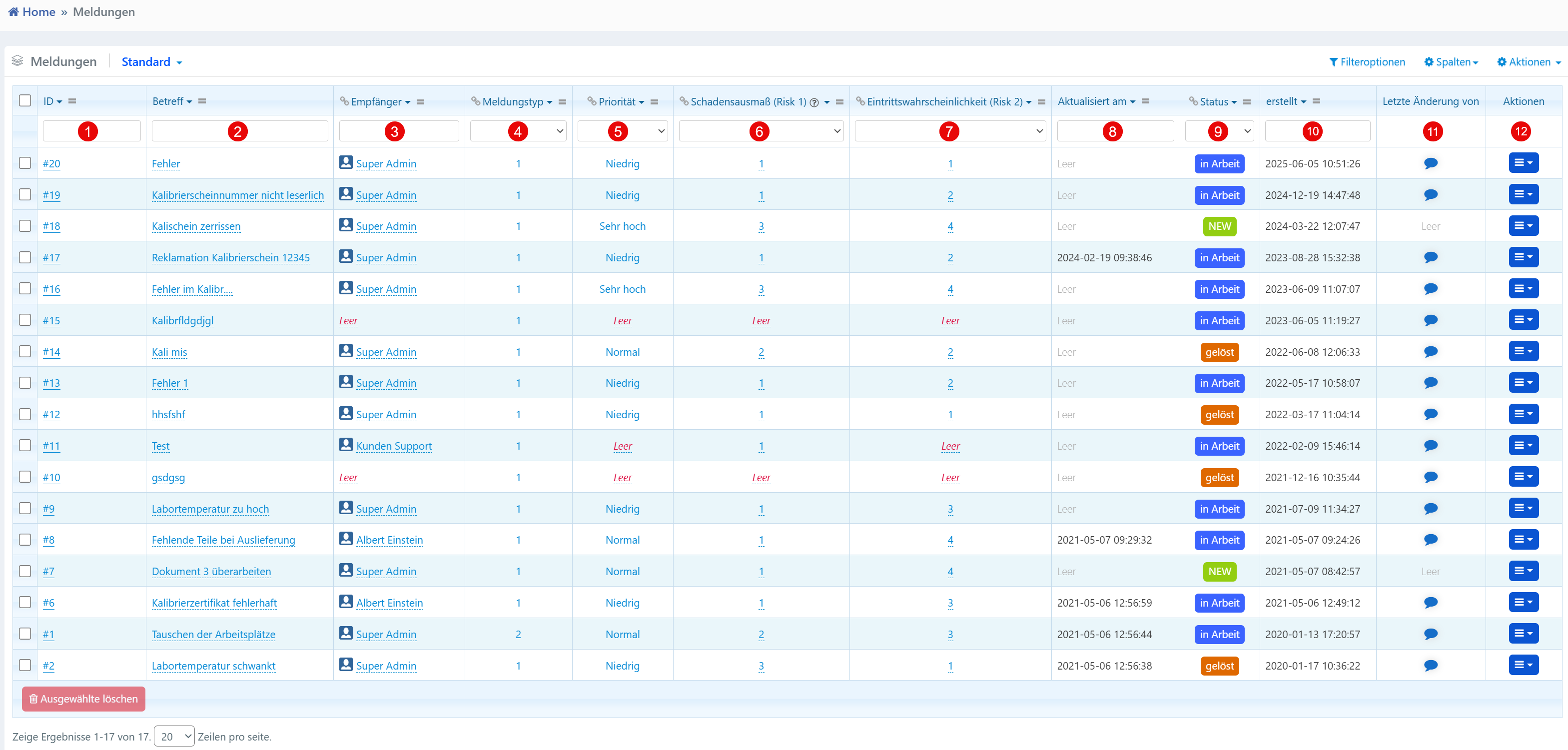

| No. | Column | Description |
|---|---|---|
| ① | ID | Unique identification number of the report |
| ② | Subject | Short title or description of the report |
| ③ | Recipient | User or user group to whom the report was assigned |
| ④ | Report Type | Classification based on a numeric type (e.g., 1 = Bug, 2 = Request) |
| ⑤ | Priority | Urgency of processing (e.g., "Low", "Normal", "Very High") |
| ⑥ | Damage Extent (Risk 1) | Assessment of the potential damage extent |
| ⑦ | Probability of Occurrence (Risk 2) | Probability of the described case |
| ⑧ | Updated On | Last modification date |
| ⑨ | Status | Processing status (e.g., "In Progress", "Resolved", "NEW") |
| ⑩ | Created | Creation timestamp of the report |
| ⑪ | Last Changed By | User of the last change |
Via the action menu, reports can be edited, commented on, escalated, or deleted.
Risk Assessment
Reports with high priority and high risk should be highlighted by the system and integrated into workflows with priority. Reports with status "Resolved" or "NEW" should be regularly validated or closed.
New Report
The input form is used for the structured entry of new reports.
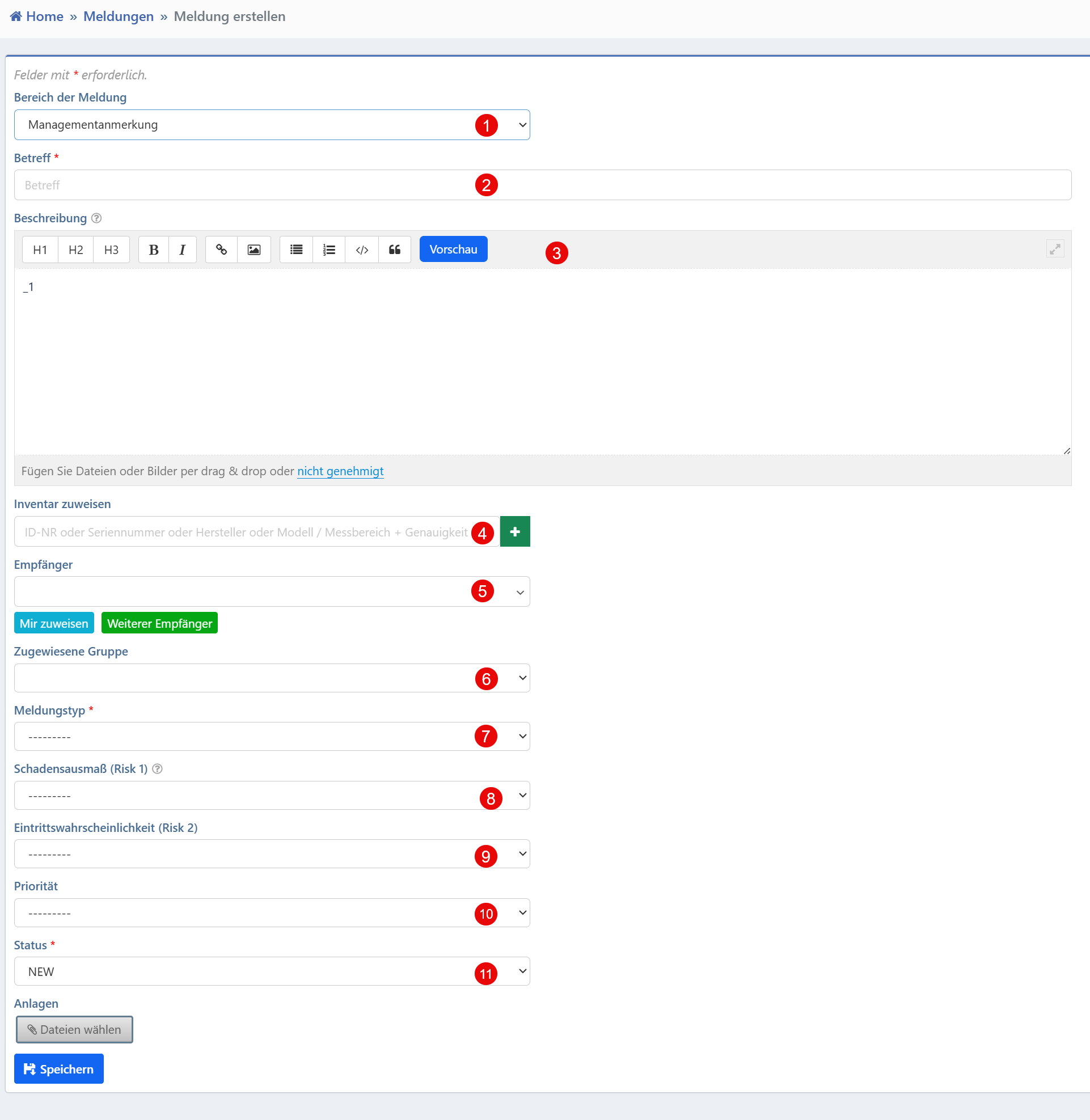
| No. | Field | Description | Required |
|---|---|---|---|
| ① | Report Area | Thematic assignment (e.g., Management, Calibration, IT) | No |
| ② | Subject | Title or short description of the report | No |
| ③ | Description | Detailed description with rich text support | No |
| ④ | Assign Inventory | Linking with a specific inventory item | No |
| ⑤ | Recipient | Selection of one or more responsible users | No |
| ⑥ | Assigned Group | Group assignment for overarching responsibilities | No |
| ⑦ | Report Type | Categorization by type (e.g., Bug, Complaint, Note) | Yes |
| ⑧ | Damage Extent (Risk 1) | Assessment of the expected damage | No |
| ⑨ | Probability of Occurrence (Risk 2) | Assessment of the probability of occurrence | No |
| ⑩ | Priority | Urgency of processing | No |
| ⑪ | Status | Processing status (preset to "NEW") | No |
The linking with inventory allows automated traceability to the affected device unit. Multiple recipients can be dynamically added via the "Assign to Me" and "Add Recipient" buttons.
The combination of damage extent and probability of occurrence enables a simple risk classification. The status is set to "NEW" upon creation and changes during the processing workflow.
Tip
Subject and description should be filled in as precisely as possible to facilitate processing.