Create Task
The task creation form is used for the structured entry of new tasks within the task tracking system. This function is used in technical support, maintenance management, or IT service processes to assign tasks to specific objects, persons, and time slots.
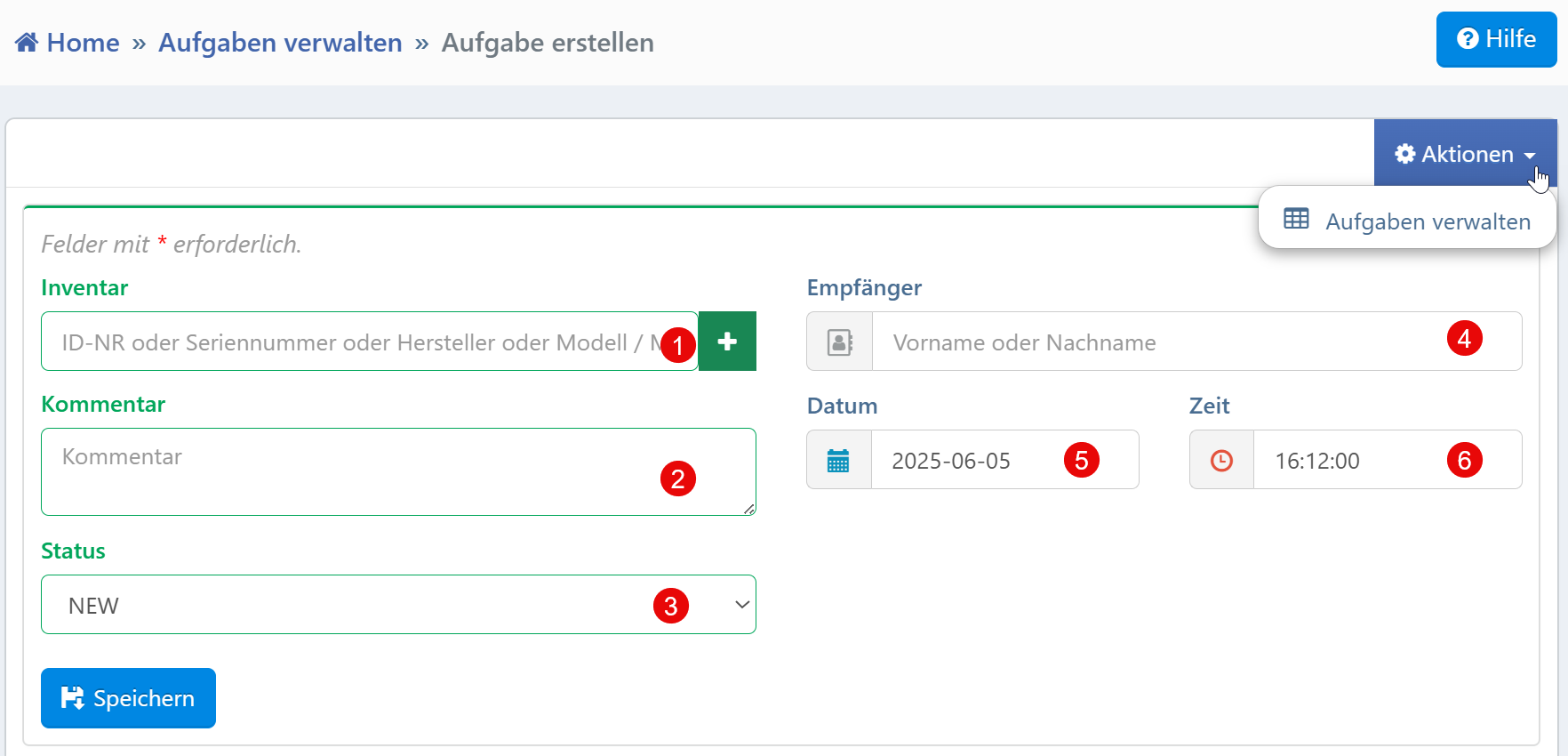
Form Fields
| No. | Field | Description | Required |
|---|---|---|---|
| ① | Inventory | Assignment of the task to a device or object via ID, serial number, manufacturer, or model | No |
| ② | Comment | Free text field for describing the task or for additional notes | No |
| ③ | Status | Definition of the task status (e.g., "NEW", "IN PROGRESS", "DONE") | No |
| ④ | Recipient | Selection of the responsible handler via name input | No |
| ⑤ | Date | Execution date of the task (ISO format YYYY-MM-DD) |
Yes |
| ⑥ | Time | Time for scheduling (format HH:MM:SS) |
Yes |
Inventory Selection
The Inventory field accepts various identifiers such as serial number, ID, manufacturer, or model name. Via the optional "+" button, a separate selection window or form for creating a new inventory entry can be opened.
Status Selection
Predefined values such as "NEW", "IN PROGRESS", "DONE", or "CANCELLED" are available. The status can be adjusted again during the subsequent processing workflow.
Recipient
When entering a first or last name, a user selection from the system is offered (auto-completion). Depending on the permission settings, only the authorized group of persons is displayed.
Typical Workflows
Task assignment in device context: A new task is created by entering the inventory, e.g., for repair, maintenance, or calibration.
Scheduling and responsibility assignment: Date, time, and recipient enable precise temporal and organizational planning.
Recording context information: Supplementary information can be documented as free text in the comment field.
Tip
After saving, automatic email or system notifications can be triggered to the recipient. The recipient assignment can be extended with escalation logic or substitution rules.