Languages
Under Administration > Settings > Languages, you manage the available languages of the system. You can create new languages, edit translations, and import or export language data.
Language Overview
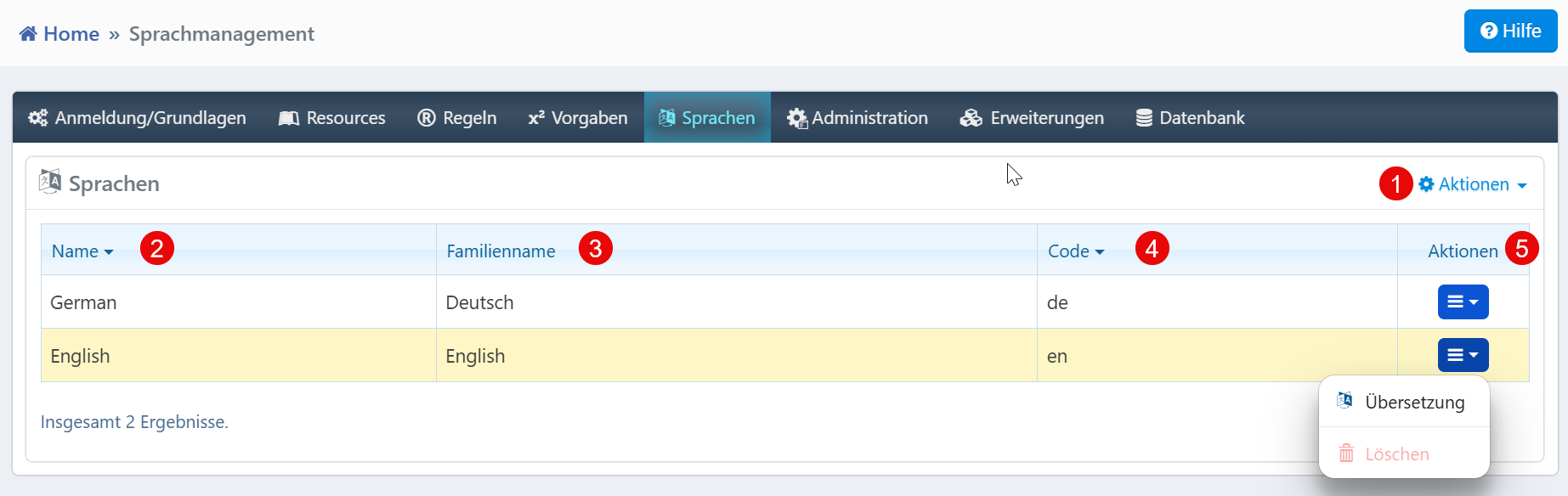
The table shows all configured languages:
| Field | Description |
|---|---|
| Name | English name of the language (e.g., "German"). |
| Family Name | Native name of the language (e.g., "Deutsch"). |
| Code | ISO 639 language code (e.g., "de", "en"). |
Actions
The following functions are available via the dropdown menu above the table:
| Action | Description |
|---|---|
| New Language | Adds a new language to the system. |
| Settings | Adjust global language settings. |
| Export | Export language data for backup or transfer. |
| Import | Import language data from an external file. |
The following options are available for each language via the row menu:
| Action | Description |
|---|---|
| Translation | Opens the translation editor for the selected language. |
| Delete | Removes the language from the system. |
Warning
Deleting a language can affect existing content and user interfaces. Check whether the language is still in use before deleting it.
Notes
- Language codes must be unique and assigned according to ISO 639.
- Standard formats (CSV, JSON) are supported for import and export.
- The columns are sortable to maintain an overview when managing many languages.