Customers
The customer module comprises three sub-areas:
- Customer List -- Overview of all customers in the system
- New Customer -- Entry of new customer data
- Contact List -- Management of contact persons
Customer List
The customer list displays all customers stored in the system. It is used for master data maintenance and is utilized by employees in sales, administration, or accounting.
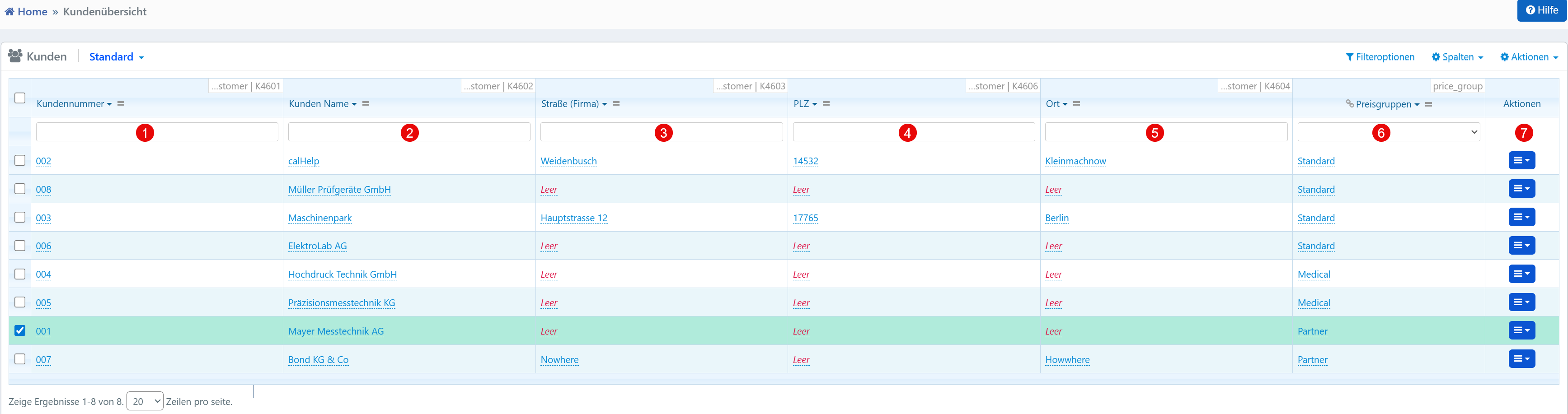

| No. | Column | Description |
|---|---|---|
| ① | Customer Number | Unique numeric identifier, system-wide unique |
| ② | Customer Name | Official name of the customer or organization |
| ③ | Street (Company) | Street and house number of the customer address |
| ④ | Postal Code | Postal code |
| ⑤ | City | City of the customer address |
| ⑥ | Price Groups | Assigned price group for differentiated pricing (e.g., "Standard", "Medical", "Partner") |
The price groups control which pricing logic is applied to quotes or invoices for the customer. The search and filter function in the header area enables quick finding of customers by name, number, or group.
Via the action menu, a customer record can be individually edited, duplicated, or archived.
New Customer
The input form for new entries is used for initial master data collection.
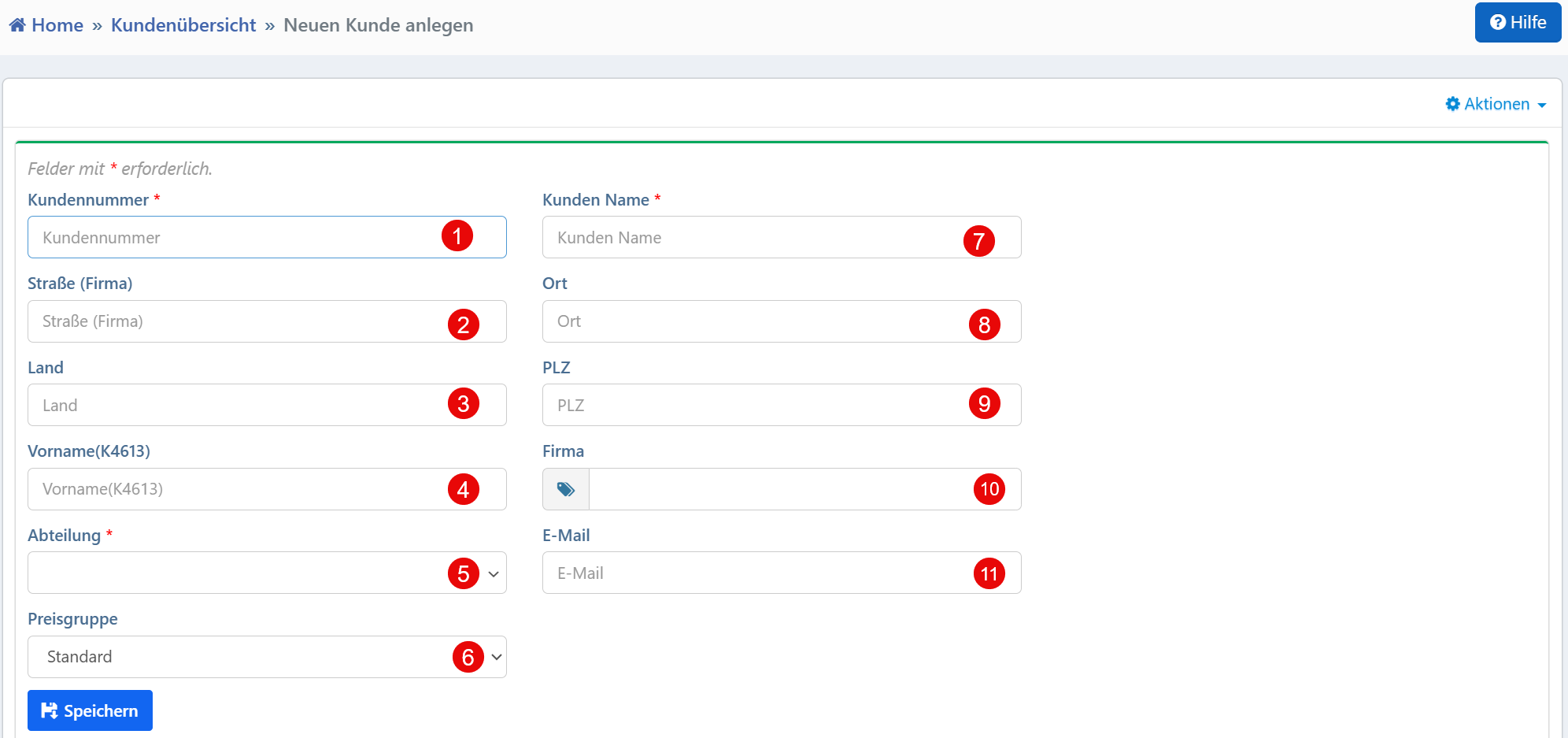
| No. | Field | Description | Required |
|---|---|---|---|
| ① | Customer Number | Unique, manually entered customer ID | Yes |
| ② | Customer Name | Official name of the customer | Yes |
| ③ | Department | Associated department within the customer organization | Yes |
| ④ | Street (Company) | Address of the customer location | No |
| ⑤ | City | City of the company headquarters | No |
| ⑥ | Postal Code | Postal code | No |
| ⑦ | Country | Country where the customer is located | No |
| ⑧ | Company | Associated company or corporate group (if different from the customer name) | No |
| ⑨ | First Name | First name of the contact person | No |
| ⑩ | Contact email address | No | |
| ⑪ | Price Group | Selection of the price group (e.g., "Standard", "Medical", "Partner") | No |
The customer number must be unique system-wide. The recorded data is later used in quotes, calibration orders, and invoices.
Tip
Email is not mandatory but is recommended for automated notifications or document delivery. Price groups are predefined in the system and can be customized per tenant.
Contact List
The contact list manages all stored contact persons of customers and is used for logistics, sales, and accounting.
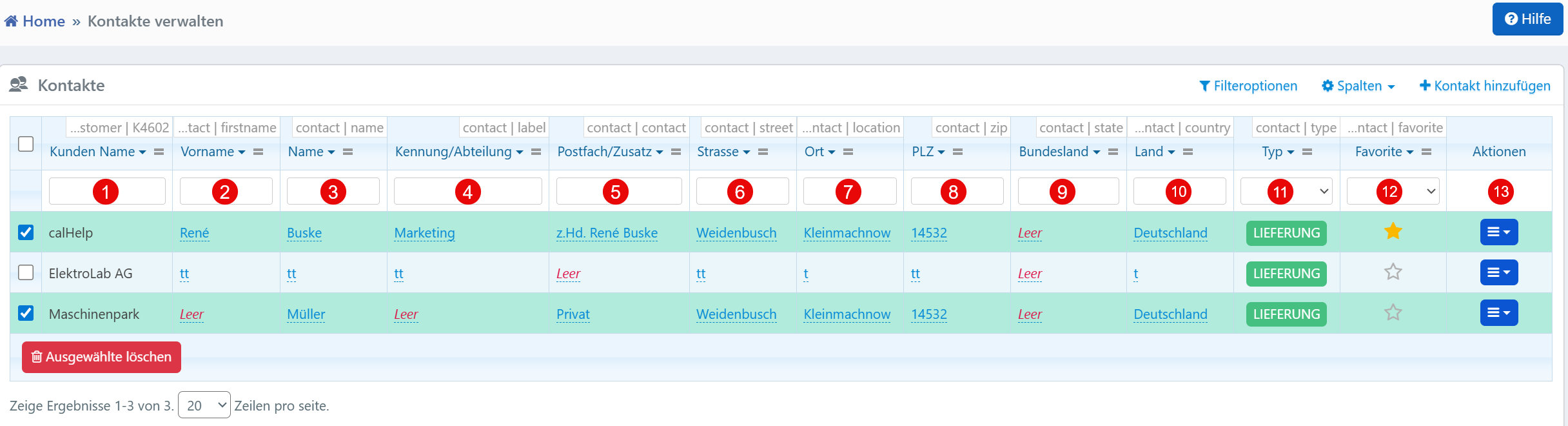
| No. | Column | Description |
|---|---|---|
| ① | Customer Name | Name of the associated company |
| ② | First Name / Last Name | First and last name of the contact person |
| ③ | Identifier / Department | Department or function within the company |
| ④ | P.O. Box / Supplement | Additional address information |
| ⑤ | Street | Street of the contact address |
| ⑥ | City / Postal Code | City and postal code |
| ⑦ | State / Country | State and country |
| ⑧ | Type | Categorization (e.g., "DELIVERY", "BILLING") |
| ⑨ | Favorite | Marking as preferred contact (e.g., for standard delivery) |
Customers can have multiple contacts with different roles and responsibilities. The Type field classifies contacts as delivery address, billing contact, or general. The favorite marking influences the automatic selection in modules such as quote, delivery note, or invoice.